Table of Contents >> Show >> Hide
- Why Remove Your Phone Number from Instagram?
- Before You Remove Your Phone Number from Instagram
- How to Remove a Phone Number from Instagram on Mobile
- How to Remove a Phone Number from Instagram on Desktop
- What If Instagram Will Not Let You Remove the Phone Number?
- How to Remove a Phone Number Used for Two-Factor Authentication
- Will Removing Your Phone Number Make Your Instagram Account Less Secure?
- Does Removing Your Phone Number Stop People from Finding You?
- How to Add an Email Before Removing Your Phone Number
- What to Do If You No Longer Have Access to the Phone Number
- Privacy and Security Tips After Removing Your Number
- Common Mistakes to Avoid
- Frequently Asked Questions
- Real-World Experiences: What It Feels Like to Remove a Phone Number from Instagram
- Conclusion
There are many reasons you might want to remove a phone number from Instagram. Maybe you switched numbers, maybe your old number now belongs to a stranger named Dave who keeps getting your login codes, or maybe you simply want fewer pieces of personal information connected to your social media account. Totally fair. Your phone number is not just a set of digits; it can be used for login recovery, two-factor authentication, account suggestions, and security checks.
The good news? Removing a phone number from Instagram is usually simple. The slightly less glamorous news? Instagram’s settings have moved around over the years, especially since Meta shifted many account controls into Accounts Center. So if you remember an old tutorial telling you to tap “Edit Profile” and delete the number from there, that may not be enough anymore. These days, the most reliable path is through Meta Accounts Center, where Instagram manages personal details like email addresses, phone numbers, birthdays, and connected accounts.
This complete guide explains how to remove your phone number from Instagram on mobile and desktop, what to do before deleting it, how two-factor authentication affects the process, and how to troubleshoot common problems. Think of it as a digital decluttering session, but without the dust bunnies.
Why Remove Your Phone Number from Instagram?
Removing your phone number from Instagram can be a smart privacy move, especially if you no longer use that number or prefer to rely on email and authenticator apps for account security. While Instagram says your email and mobile number are private on your account, private does not always mean unnecessary. If you do not need a phone number attached, reducing the amount of personal data connected to your profile can give you more control.
Common reasons include:
- You changed your number: Keeping an old number attached can create recovery problems later.
- You want better privacy: A phone number can be tied to identity, contact matching, and account recovery.
- You are reducing SMS security risks: Text-message verification is convenient, but authenticator apps are generally safer.
- You manage multiple accounts: A number attached to several profiles can cause confusion.
- You are cleaning up old data: Sometimes the best security upgrade is simply removing what you do not use.
That said, do not remove your number carelessly. Instagram may require at least one confirmed contact method, such as a verified email address or another confirmed mobile number. If your phone number is your only recovery method and you delete it without confirming your email first, you could make account recovery harder than assembling furniture with instructions written by a raccoon.
Before You Remove Your Phone Number from Instagram
Before you tap delete, take a minute to secure your account. Removing a number is easy; recovering an account without a working contact method is the part that can make grown adults whisper “why me?” into their coffee.
1. Confirm your email address
Make sure your Instagram account has a current, accessible, verified email address. This is the most important step. If Instagram asks you to confirm your identity later, your email may be the main place you receive security codes and recovery links.
2. Check your password
If you have been logged in for years and have no idea what your password is, fix that first. Use a strong, unique password that you do not use on any other website. A password manager can help you create and store one safely.
3. Review two-factor authentication
If your phone number is used for SMS-based two-factor authentication, you may need to change your two-factor method before removing it. Instagram supports security methods such as authentication apps. An authenticator app is usually a better choice than SMS because it does not depend on your mobile carrier or phone number.
4. Save backup codes
If Instagram offers backup codes in your two-factor authentication settings, save them somewhere secure. Backup codes are like spare keys. You hope you never need them, but future-you will send present-you a thank-you card if you do.
5. Check for suspicious account activity
Before changing security details, review where you are logged in. Remove unfamiliar devices, update your password if needed, and make sure no unknown email address, phone number, or connected account has been added.
How to Remove a Phone Number from Instagram on Mobile
The Instagram app is the easiest place for most users to remove a phone number. The exact wording may vary slightly between iPhone and Android, but the general path is the same.
Step-by-step mobile instructions
- Open the Instagram app on your iPhone or Android phone.
- Tap your profile picture in the bottom-right corner.
- Tap the three-line menu in the top-right corner.
- Select Accounts Center.
- Tap Personal details.
- Tap Contact info.
- Select the phone number you want to remove.
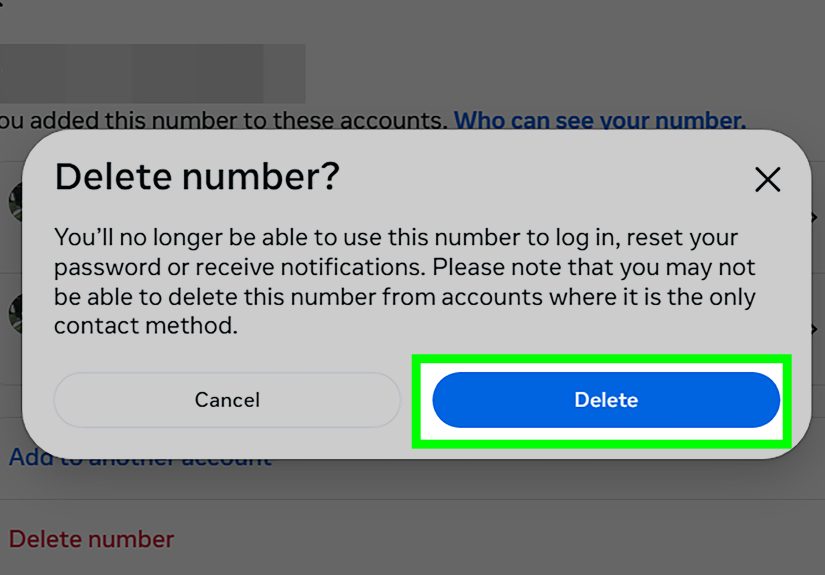
- Tap Delete number or Remove, depending on your app version.
- Follow the confirmation prompts.
After removing the number, return to the Contact info page and confirm that only the contact methods you want remain. If Instagram refuses to delete the number, it is usually because the number is still being used for login recovery, two-factor authentication, or it is the only confirmed contact method on the account.
How to Remove a Phone Number from Instagram on Desktop
If you prefer using a computer, you can remove your phone number through Instagram’s web settings. This is also useful if your app is glitching or the menu does not appear where you expect it.
Step-by-step desktop instructions
- Go to Instagram.com and log in.
- Click More or your profile menu, depending on the layout.
- Open Settings.
- Select Accounts Center.
- Click Personal details.
- Choose Contact info.
- Click the phone number connected to your Instagram account.
- Select Delete number or Remove.
- Confirm the change.
If the web version sends you back to Meta Accounts Center, do not panic. That is normal. Meta centralizes account information for Instagram, Facebook, Threads, and other Meta services in one place. It can feel like walking through a hallway of doors, but the door you want is still “Personal details” followed by “Contact info.”
What If Instagram Will Not Let You Remove the Phone Number?
Sometimes Instagram blocks removal for security reasons. Annoying? Yes. Random? Usually not. Here are the most common causes and fixes.
Your email address is not confirmed
If your phone number is your only confirmed contact method, Instagram may not let you remove it. Add and verify an email address first. Once the email is confirmed, try deleting the number again.
The number is used for two-factor authentication
If SMS two-factor authentication is active, switch to an authentication app before removing the number. Go to Accounts Center, open Password and security, choose Two-factor authentication, select your Instagram account, and change the method from text message to an authentication app if available.
You recently changed account details
Instagram may temporarily restrict certain changes after suspicious activity, a password reset, a new login, or multiple security edits. Wait a while, make sure your account is secure, and try again later.
The app is outdated
Old app versions can show outdated settings or fail to load Accounts Center correctly. Update Instagram from the App Store or Google Play Store, restart the app, and repeat the steps.
You are managing the wrong account
If you have multiple Instagram profiles, double-check that you are editing the correct one. It sounds obvious, but social media accounts multiply faster than browser tabs during online shopping.
How to Remove a Phone Number Used for Two-Factor Authentication
There is a difference between removing your phone number from your contact information and removing it from two-factor authentication. If your number is used to receive login codes, you should replace that method before deleting the number from your account.
Recommended process:
- Open Instagram and go to your profile.
- Tap the menu icon.
- Go to Accounts Center.
- Tap Password and security.
- Select Two-factor authentication.
- Choose your Instagram account.
- Add or switch to an authentication app.
- Save backup codes if available.
- Return to Personal details and remove the phone number from Contact info.
This method keeps your account protected while reducing your dependence on SMS. Text messages can be intercepted through SIM swap scams, number porting fraud, or carrier account compromise. An authenticator app is not perfect, but it removes your mobile carrier from the login-code equation, which is a meaningful security upgrade.
Will Removing Your Phone Number Make Your Instagram Account Less Secure?
It depends on what you use instead. If you remove your phone number and leave your account with a weak password and no two-factor authentication, then yes, your account becomes less secure. That is like taking the lock off your front door because you do not like carrying keys.
However, if you remove your phone number after confirming your email, creating a strong password, enabling an authenticator app, and saving backup codes, your account can remain secure or even become more secure. The goal is not to have fewer security layers. The goal is to use better ones.
Does Removing Your Phone Number Stop People from Finding You?
Removing your number may reduce some ways Instagram connects your account with contact information, but it does not guarantee that nobody can find you. Instagram may still suggest your profile based on mutual followers, shared activity, connected accounts, synced contacts, profile interactions, or other signals.
If privacy is your main goal, also review these settings:
- Contact syncing: Turn off contact uploading if you do not want Instagram using your phone contacts.
- Account suggestions: Review whether your account is suggested to others.
- Connected accounts: Check whether Facebook, Threads, or other Meta accounts are linked.
- Profile visibility: Consider switching to a private account.
- Old bio details: Remove personal information from your bio, captions, and highlights.
Remember, removing a phone number is one privacy step, not an invisibility cloak. Sadly, Instagram does not currently offer a “become a mysterious woodland legend” button.
How to Add an Email Before Removing Your Phone Number
If Instagram asks for another contact method, add an email address first. Use an email you actively control, not an old school account, work account, or inbox you abandoned sometime around the era of low-rise jeans.
To add or update your email:
- Open Instagram.
- Go to your profile and tap the menu icon.
- Open Accounts Center.
- Tap Personal details.
- Select Contact info.
- Add or edit your email address.
- Check your inbox and confirm the email if Instagram sends a verification message.
After your email is confirmed, return to Contact info and remove the phone number. If the confirmation email does not arrive, check spam, promotions, social tabs, and any email filters that might be hiding it.
What to Do If You No Longer Have Access to the Phone Number
If the phone number on Instagram is old, inactive, or belongs to someone else now, do not ignore it. Update your account as soon as possible.
First, try logging in with your username, email, or saved session. If you can access the account, add a verified email, change your password, switch away from SMS two-factor authentication, and remove the old phone number. If you cannot log in because Instagram keeps sending codes to the old number, use Instagram’s account recovery options and follow the prompts for lost access.
If you suspect someone added their phone number to your account, act quickly. Change your password, review contact information, remove unknown linked accounts, check login activity, and secure your email account too. Your Instagram security is only as strong as the email address attached to it.
Privacy and Security Tips After Removing Your Number
Once your number is removed, take a few extra minutes to tighten the rest of your account. These small steps can prevent big headaches later.
Use a strong password
A good password is long, unique, and not based on your birthday, pet name, favorite team, or “Password123,” which should be launched into the sun. Use a password manager if possible.
Use an authentication app
Authenticator apps generate time-sensitive login codes on your device. They are generally safer than SMS codes because attackers cannot receive them simply by stealing or transferring your phone number.
Review login activity
Remove devices you do not recognize. If you see a login from a place you have never visited, do not immediately assume teleportation. Change your password and secure the account.
Check official Instagram emails
Instagram lets users review recent official emails in the app. This can help you spot fake messages pretending to be from Instagram. If an email asks for your password, security code, or payment details, treat it with suspicion.
Protect your mobile carrier account
Even after removing your number from Instagram, your phone number may still protect other accounts. Set a PIN or password with your mobile carrier to reduce the risk of SIM swap fraud.
Common Mistakes to Avoid
Removing a phone number from Instagram is simple, but a few mistakes can make the process more stressful than necessary.
- Deleting the number before confirming email: Always confirm another recovery method first.
- Turning off all two-factor authentication: Replace SMS with an authenticator app instead.
- Ignoring linked Meta accounts: Check Accounts Center for Facebook, Threads, and other connected profiles.
- Using an email you cannot access: Recovery emails only help if you can open the inbox.
- Assuming removal is instant everywhere: Some account systems may take time to update fully.
Frequently Asked Questions
Can I use Instagram without a phone number?
Yes, many users can use Instagram with a confirmed email address instead of a phone number. However, Instagram may sometimes request phone verification for security, spam prevention, or account recovery.
Will people see my phone number on Instagram?
Your personal phone number is not displayed publicly on a standard Instagram profile. Business or creator accounts may choose to show contact buttons, so check your professional profile settings if you use one.
Why does Instagram say I need another contact method?
Instagram generally wants at least one confirmed way to contact you for login and recovery. Add and verify an email address before deleting your phone number.
Can I remove my number from one Instagram account but keep it on another?
Yes, but you should carefully check Accounts Center to see which account the number is attached to. If several profiles share the same contact information, edit the correct profile to avoid removing the wrong number.
Is it better to use email or phone number for Instagram?
For recovery, a secure email address is often more flexible. For two-factor authentication, an authenticator app is generally stronger than SMS. The best setup is a verified email, a strong password, and app-based two-factor authentication.
Real-World Experiences: What It Feels Like to Remove a Phone Number from Instagram
In real life, removing a phone number from Instagram is rarely dramatic, but it can feel surprisingly satisfying. Many users start the process because something small feels off. Maybe they receive a login code they did not request. Maybe they switch carriers and realize their old number is still attached to three Instagram accounts, a forgotten Facebook page, and an online shopping account from 2016. Or maybe they are simply trying to create a cleaner digital footprint.
One common experience is the “wait, where did that setting go?” moment. Instagram has changed its menus several times, and older guides often point to Edit Profile instead of Accounts Center. Users may tap through profile settings, privacy settings, security settings, and personal information screens before realizing the number is managed under Meta’s broader account system. This can be frustrating, but once you know the correct path, the process becomes much easier.
Another common scenario involves two-factor authentication. A user tries to delete the phone number, but Instagram will not allow it because SMS login codes are still active. At first, this feels like Instagram is being stubborn for sport. In reality, it is trying to prevent users from locking themselves out. The smoother approach is to set up an authentication app first, confirm it works, save backup codes, and then remove the number. This turns a possible lockout into a controlled security upgrade.
Some people also discover that their old number is more connected than expected. They remove it from Instagram, then realize it is still connected to Facebook, Threads, WhatsApp, or another Meta profile in Accounts Center. That is why it is worth checking all contact info in Accounts Center instead of only looking at one Instagram profile. If you manage business pages, creator accounts, or multiple personal profiles, be extra careful. Removing a number from the wrong place can create confusion later.
There is also a privacy benefit that feels psychological as much as technical. Your phone number is one of those personal details that follows you everywhere. It is used for banking, deliveries, school forms, medical offices, group chats, and the occasional restaurant reservation that somehow becomes a marketing list. Removing it from a social app can feel like closing one small window that did not need to be open.
However, the best experience comes from preparing first. Users who confirm their email, update their password, and turn on app-based two-factor authentication usually remove their number without drama. Users who skip those steps are more likely to run into verification loops, missing codes, or recovery delays. In other words, do the boring security housekeeping first. It is not glamorous, but neither is getting locked out of your account while your vacation photos sit behind a login screen.
For parents, creators, freelancers, and small business owners, removing a phone number can also reduce anxiety around personal boundaries. A public-facing Instagram account can attract customers, fans, classmates, strangers, bots, and people who comment “DM us for promo” under a photo of soup. Keeping your personal number away from that ecosystem is reasonable. If you need contact options, use a business email, contact form, or dedicated work number instead of your everyday mobile number.
The biggest lesson from real-world use is simple: do not treat phone-number removal as a single button tap. Treat it as part of account maintenance. Check your login activity, remove old devices, confirm your email, review linked accounts, and make sure your security method still works. Once that is done, deleting your phone number from Instagram becomes less risky and more empowering.
Conclusion
Removing a phone number from Instagram is a smart move when the number is outdated, unnecessary, or no longer the best option for your privacy and security. The current best route is through Accounts Center: go to Personal details, open Contact info, select your number, and delete it. Just make sure you have a verified email address and a reliable two-factor authentication method before you do.
If your number is tied to SMS two-factor authentication, switch to an authenticator app first. If Instagram blocks removal, check whether your email is confirmed, your app is updated, and your account has another valid recovery method. The process may take a few extra taps, but it is worth doing correctly.
Note: Instagram and Meta settings may vary slightly by app version, device, region, and account type. If a menu label looks different, look for the closest option related to Accounts Center, Personal details, Contact info, Password and security, or Two-factor authentication.