Table of Contents >> Show >> Hide
- What Does “Whisper” Mean in Minecraft?
- The Quick Answer: How to Whisper in Minecraft
- How to Open Chat Before Using a Whisper Command
- The Three Main Minecraft Whisper Commands
- /tell vs /msg vs /w: What Is the Difference?
- Minecraft Whisper Command Examples
- Can You Whisper in Minecraft Java Edition?
- Can You Whisper in Minecraft Bedrock Edition?
- Do You Need Cheats Enabled to Whisper?
- How to Reply to a Whisper in Minecraft
- Common Mistakes When Whispering in Minecraft
- When Should You Use Whisper Commands?
- Best Practices for Whispering in Minecraft
- Can You Whisper to All Players?
- What Is /tellraw, and Is It the Same as Whispering?
- Troubleshooting: Why Is My Whisper Command Not Working?
- Practical Experience: What Whispering Feels Like in Real Multiplayer
- Conclusion
Note: This article is written for players using standard Minecraft chat commands. Some servers, Realms, plugins, or parental/account settings may change how private messages appear or whether they are available.
What Does “Whisper” Mean in Minecraft?
In Minecraft, “whispering” means sending a private chat message to another player instead of broadcasting your message to everyone in the world or server. It is basically Minecraft’s version of a direct message, minus the fancy inbox, profile picture, and dramatic “seen at 2:14 PM” anxiety.
The most common whisper commands are /tell, /msg, and /w. These commands do the same basic job: they send a message to a specific player or selected group of players. If normal chat is like yelling across the village square, whispering is like leaning over and saying, “Hey, I found diamonds, but please do not invite the creeper committee.”
Learning how to whisper in Minecraft is useful for multiplayer survival, minigames, Realms, roleplay servers, adventure maps, team strategy, moderation, and friendly conversations that do not need to become everyone’s business. Whether you are warning a teammate about a trap or telling your friend where you hid the emergency baked potatoes, private messages make multiplayer communication much cleaner.
The Quick Answer: How to Whisper in Minecraft
To whisper in Minecraft, open chat and type one of the private message commands followed by the player’s name and your message.
You can also use:
For example:
Only Alex should receive that message. Everyone else can continue punching trees in blissful ignorance.
How to Open Chat Before Using a Whisper Command
Before you can whisper, you need to open the chat window. On Minecraft Java Edition for PC, the default key is usually T. You can also press / to open chat with a slash already entered, which is handy when you are about to type a command.
On consoles and mobile devices, the chat button depends on your platform and control layout. Look for the chat icon or open the pause/menu interface and choose chat. Once the chat box is open, type your command, player name, and message.
Basic Format
The slash tells Minecraft you are using a command. The command tells the game what to do. The player name tells the game who should receive the message. The message is the actual text you want to send.
The Three Main Minecraft Whisper Commands
1. The /tell Command
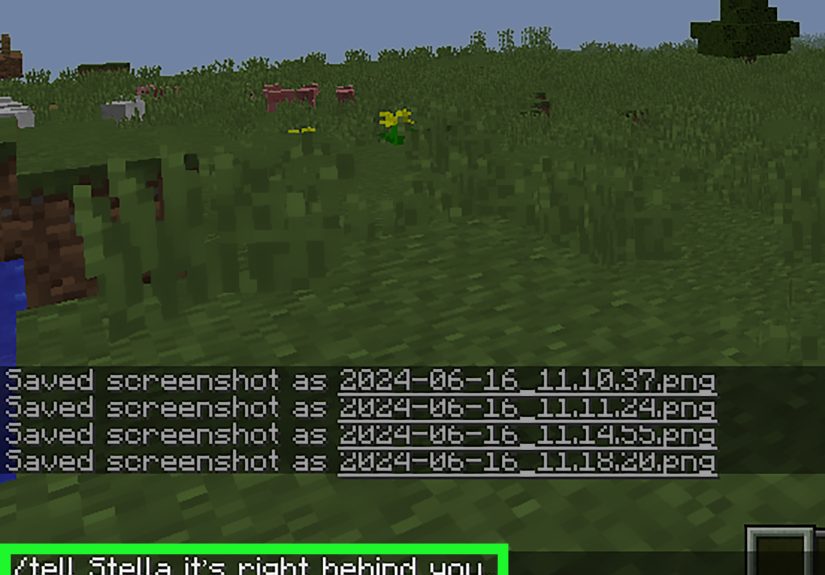
The /tell command is one of the most recognizable ways to send a private message in Minecraft. It is simple, readable, and easy to remember because you are literally telling one player something.
This sends a private message to Steve. It is great for players who like clear commands and do not mind typing a few extra letters.
2. The /msg Command
The /msg command is another common way to whisper. Many players prefer it because “msg” obviously means message, and it is shorter than /tell.
This does the same job as /tell. On many servers, /msg is the command players use most often for private chat.
3. The /w Command
The /w command is the shortest option. The “w” stands for whisper, and yes, Minecraft players are very serious about saving three keystrokes while carrying 27 stacks of cobblestone.
Because it is fast, /w is useful in minigames, PvP, or urgent survival moments. When your friend is one step away from walking into lava, this is not the time to write a formal letter.
/tell vs /msg vs /w: What Is the Difference?
For normal players, there is usually no meaningful difference. In standard Minecraft usage, /tell, /msg, and /w are aliases for private messaging. That means they lead to the same result: a private message sent to the target player.
The best command is the one you remember quickly. New players may find /tell easier to understand. Regular multiplayer players often prefer /msg. Speed-focused players love /w because it is tiny, efficient, and looks like it drinks espresso.
Minecraft Whisper Command Examples
Example 1: Send a Simple Private Message
This privately asks Alex if they want to explore a cave. Public chat remains untouched.
Example 2: Send Coordinates Privately
This is perfect when you do not want the whole server knowing where your base is. Publicly posting your base coordinates is basically placing a welcome mat for griefers.
Example 3: Warn a Teammate
Fast, helpful, and much better than watching your teammate get launched into a ravine by surprise.
Example 4: Message More Than One Player
Target selectors can be used in some command contexts to select players. However, remember that sending to @a means all players, so that is not exactly a private whisper. It is more like whispering with a megaphone.
Can You Whisper in Minecraft Java Edition?
Yes. In Minecraft Java Edition, players can use private message commands such as /tell, /msg, and /w in multiplayer worlds and servers where chat commands are allowed. The basic format is:
Java Edition also supports command suggestions and tab completion in many cases. That means you can start typing a player’s name and press Tab to complete it, depending on the server and your settings. This is especially helpful when someone has a username that looks like it was assembled by a keyboard during an earthquake.
Can You Whisper in Minecraft Bedrock Edition?
Yes. Minecraft Bedrock Edition also supports private messages with commands such as /tell, /msg, and /w. The common format is:
Bedrock Edition is used on platforms such as Xbox, PlayStation, Nintendo Switch, Windows, and mobile devices. The chat interface may look different depending on your device, but the basic idea is the same: open chat, type the command, choose the player, and send your message.
Do You Need Cheats Enabled to Whisper?
Usually, basic chat commands like private messaging are available in multiplayer chat without enabling world-changing cheats. However, server settings, Realm permissions, parental controls, moderation systems, and plugins can affect what commands are allowed.
If a command does not work, it does not always mean you typed it wrong. The server may have private messaging disabled, replaced by a plugin command, or restricted for new players. Some servers use custom commands like /pm, /message, or /r for replies. Always check the server’s help menu, website, or rules if standard whisper commands fail.
How to Reply to a Whisper in Minecraft
Vanilla Minecraft does not always provide the same reply shortcut across every server or edition, but many multiplayer servers add a convenient reply command such as:
For example:
If your server supports it, /r usually sends a message back to the last person who messaged you. Be careful, though. If multiple people are messaging you, double-check who will receive your reply. Sending “hide the diamonds under the chicken pen” to the wrong person can create a very exciting economy problem.
Common Mistakes When Whispering in Minecraft
Typing the Player Name Wrong
Minecraft usernames must be typed correctly. If you misspell the name, the command may fail or target the wrong player if a similar name exists. Use tab completion when available.
Forgetting the Slash
If you type msg Alex hello without the slash, Minecraft treats it like a normal chat message. Everyone may see it. That is unfortunate if the message was supposed to be private, especially if it involved secret base plans or dramatic sheep-related accusations.
Using Public Chat by Accident
Always check that your message starts with /tell, /msg, or /w. If it does not, you are probably speaking to the whole server.
Assuming Whispers Are Completely Secret
Private messages are private from normal players, but server owners, administrators, moderation tools, or logs may still record chat activity. Do not use Minecraft whispers for sensitive personal information. Keep it friendly, safe, and game-related.
When Should You Use Whisper Commands?
Whisper commands are useful whenever a message is meant for one player instead of the entire group. In survival multiplayer, you can share coordinates, plan builds, organize trades, or quietly ask for help. In PvP, you can coordinate attacks, warn teammates, or discuss strategy without handing your plan to the enemy on a diamond platter.
In roleplay servers, whispering helps characters have side conversations. In creative servers, builders can discuss project details without filling chat. In minigames, quick private messages can help teammates make decisions faster. Used well, whispers reduce chat clutter and make multiplayer feel more organized.
Best Practices for Whispering in Minecraft
Keep Messages Clear
Short, direct messages work best. Instead of typing a long paragraph during a zombie attack, say exactly what matters:
Do Not Spam Players
Private messages are useful, but spamming someone with 24 whispers about one missing carrot is not exactly heroic behavior. If someone does not respond, give them time.
Respect Server Rules
Some servers have rules about private messaging, advertising, harassment, or trading. Whispering does not make rule-breaking invisible. Good Minecraft etiquette still applies.
Use Public Chat When Everyone Needs the Message
If the whole team needs to know something, public chat is better. Whispering is for targeted communication, not for making everyone play detective.
Can You Whisper to All Players?
You can use target selectors in some commands, but whispering to all players is not really whispering anymore. For example:
This sends the message to all players, depending on permissions and edition behavior. If your goal is a public announcement, use public chat or a server announcement command instead. A whisper to everyone is just public chat wearing a fake mustache.
What Is /tellraw, and Is It the Same as Whispering?
The /tellraw command is different from normal whisper commands. It is used to send formatted JSON text to players, often in maps, datapacks, command blocks, and custom server systems. It can create colored text, clickable messages, hover text, and other advanced chat effects, depending on edition and syntax.
For everyday private messaging, you do not need /tellraw. Stick with /tell, /msg, or /w. Think of /tellraw as the command-block wizard version. Powerful? Yes. Necessary for telling your friend “bring a pickaxe”? Absolutely not.
Troubleshooting: Why Is My Whisper Command Not Working?
The Player Is Offline
Most whisper commands require the player to be online. If they left the server, your message will not reach them.
The Server Uses Custom Chat Plugins
Large servers often replace vanilla private messages with custom systems. Try checking /help or asking a moderator what command the server uses.
You Do Not Have Permission
Some commands may be restricted by rank, account settings, or server rules. If you see a permission error, the server is blocking the command for your account level.
You Used the Wrong Syntax
Make sure your command follows this order:
Do not put the message before the player name. Minecraft is clever, but it is not a mind reader wearing enchanted leggings.
Practical Experience: What Whispering Feels Like in Real Multiplayer
After using whisper commands in Minecraft for a while, you start to realize they are not just a tiny chat feature. They are a multiplayer survival tool. The first time you privately send coordinates to a friend instead of posting them in public chat, you feel like a genius strategist. The second time, you wonder why you ever trusted public chat with anything more valuable than “hello.”
One common experience is using whispers during cave exploration. Imagine you and a friend split up underground. You find a huge ravine, a mineshaft, and enough mobs to open a skeleton convention. Instead of filling public chat with updates, you send a quick whisper: “Found mineshaft. Need backup.” It keeps the message focused and prevents the whole server from rushing over like there is a free diamond buffet.
Whispers are also great during base-building. In many survival servers, players like to keep their storage rooms, farms, and secret entrances private. A simple /msg can help you tell one trusted friend where to go without turning your hidden base into a tourist attraction. This is especially helpful on servers where players enjoy pranks. Minecraft pranks can be funny, but nobody wants to discover their roof has been replaced with 600 chickens because they shared coordinates too loudly.
In team games, /w becomes the speed command. It is short enough to type quickly when things are chaotic. During PvP, every second matters. A message like /w Alex left side can be more useful than a long explanation. The best whispers are clear, fast, and specific. You are not writing a novel; you are trying to survive someone charging at you with an enchanted sword and suspicious confidence.
There is also a social side to whispering. Private messages make it easier to welcome new players, ask questions, or quietly help someone who seems confused. Instead of calling them out in public chat, you can whisper a quick tip. That keeps the server friendly and avoids making someone feel embarrassed. A helpful private message can turn a lost beginner into a future teammate.
However, experience also teaches one big lesson: always check the slash. Many players have accidentally typed a “private” message into public chat because they forgot the command. It is practically a Minecraft rite of passage. The good news is that after one embarrassing mistake, you will probably double-check forever. That tiny slash is the difference between secret strategy and server-wide comedy.
The best habit is to use /msg for normal private conversations, /w for quick urgent notes, and /tell when teaching newer players because it is easier to understand. Once you are comfortable with all three, whispering becomes second nature. You will spend less time fighting the chat box and more time doing important Minecraft work, such as building castles, losing your horse, and pretending you meant to fall into that cave.
Conclusion
Whispering in Minecraft is one of the easiest ways to communicate privately in multiplayer. The commands /tell, /msg, and /w let you send direct messages to another player without filling public chat. Use them for coordinates, team strategy, warnings, trades, roleplay, and friendly side conversations.
For most players, the simplest command to remember is /msg PlayerName Message. If you want speed, use /w. If you want clarity, use /tell. Just remember that private messages may still be visible to server moderation tools or logs, so keep communication safe and respectful.
Once you learn how to whisper in Minecraft, multiplayer becomes smoother, cleaner, and a little less chaotic. Well, chat becomes less chaotic. The creepers are still very committed to their brand.