Table of Contents >> Show >> Hide
- Before You Download Anything: Know the Difference Between Free, Royalty-Free, and Safe
- 1. Use the YouTube Audio Library First
- 2. Download Music Under Creative Commons Licenses
- 3. Look for Public Domain Music and Historic Recordings
- 4. Use Creator Music Libraries With Free Download Options
- 5. Get Direct Permission From Independent Artists
- How to Avoid Copyright Trouble After You Download the Music
- Which Method Is Best for You?
- Creator Experiences: What People Learn After Hunting for Free Music
- Conclusion
If you have ever spent three hours editing a YouTube video only to get stuck on the soundtrack, welcome to the club. The visuals are polished, the pacing is sharp, your thumbnail is practically begging for clicks, and then reality arrives wearing a legal suit and carrying a giant sign that says, “You can’t just grab that song from the internet, champ.”
The good news is that there are legitimate ways to download free music for your YouTube videos. The better news is that you do not need to wander into the dark alley of suspicious MP3 sites where every download button looks like a trap designed by a villain with excellent CSS skills.
In this guide, we’ll walk through five smart ways to find free music for YouTube content, how to avoid copyright headaches, and what “royalty-free,” “Creative Commons,” and “public domain” actually mean in plain English. By the end, you should have a practical roadmap for finding background music for vlogs, tutorials, gaming videos, Shorts, travel edits, and everything in between.
Before You Download Anything: Know the Difference Between Free, Royalty-Free, and Safe
Let’s clear up the biggest source of confusion right away. “Free music” does not always mean “do whatever you want forever.” Some tracks are free to download but still require attribution. Some are free for personal use but not commercial YouTube videos. Some are royalty-free, which sounds magical, but usually means you do not pay ongoing royalties for each use, not that the music has no copyright at all.
That distinction matters because YouTube’s systems care deeply about rights, permissions, and whether your soundtrack is properly licensed. So before you fall in love with a dramatic piano track that makes your coffee-making tutorial feel like an Oscar contender, check the license terms first.
As a rule, safe YouTube music usually falls into one of these categories:
- Music from YouTube’s own Audio Library
- Music released under Creative Commons licenses
- Public domain recordings or works
- Tracks from creator libraries with a free-use tier
- Music you have direct permission to use from the artist
Now let’s get into the five best ways to download free music for your YouTube videos without summoning a copyright claim out of thin air.
1. Use the YouTube Audio Library First
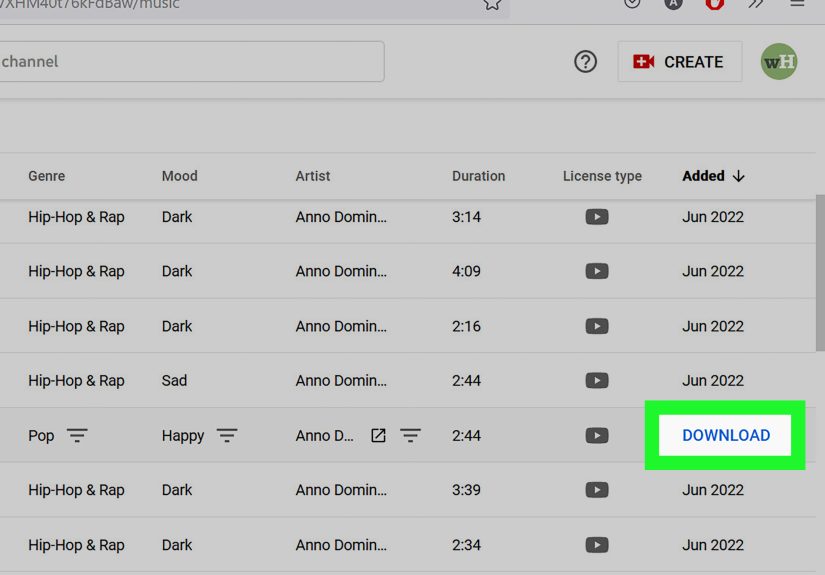
If you want the easiest and most beginner-friendly option, start with the YouTube Audio Library. It lives inside YouTube Studio and is basically the platform saying, “Here, please use this instead of creating problems for both of us.” That alone makes it a strong first stop.
The library includes free music tracks and sound effects that creators can use in videos. Some tracks require attribution, while others do not. The interface also lets you browse by mood, genre, instrument, duration, and attribution requirements, which is a gift when you know you want “upbeat acoustic but not too wedding-slideshow-ish.”
Why it works well
The biggest advantage is simplicity. Since the music comes through YouTube’s own system, creators tend to feel more confident using it. You are not juggling screenshots, confusing PDFs, or mysterious licensing jargon written like a wizard’s contract.
Best for
- New YouTubers
- Tutorial channels
- Vlogs and lifestyle content
- Creators who want fast, low-stress downloads
Watch out for this
Not every track is attribution-free. Some tracks ask you to credit the artist in your description. That is not hard, but it is something you should do consistently. Skip that step and your “free music” can become “why is there a claim on my cooking video?” very quickly.
2. Download Music Under Creative Commons Licenses
Creative Commons music is one of the most useful resources for YouTube creators, especially if you are willing to read the label before opening the snack. Many artists share tracks under licenses that allow reuse, but the exact permissions depend on which Creative Commons license applies.
For example, some licenses allow commercial use with attribution. Others prohibit commercial use. Some allow remixing. Some say absolutely not. This is why “Creative Commons” is not a single magic pass; it is a family of licenses with different rules.
A great place to browse this kind of music is the Free Music Archive, which offers original music from independent artists and provides filtering options that help you search by usage rights. That makes it much easier to find tracks suitable for video and commercial use.
Why it works well
You get access to music that often feels more unique than the standard “inspirational ukulele with light clapping” formula. Creative Commons tracks can give smaller channels a more distinctive sound without spending money.
Best for
- Documentary-style videos
- Essay channels
- Travel edits
- Creators who want less generic background music
Watch out for this
Read the exact license. If a track is marked noncommercial, monetized YouTube content may not qualify. If the license requires attribution, include it exactly as requested. And if a license forbids derivatives, do not chop, remix, or heavily alter the music and then act surprised when the rules still apply.
3. Look for Public Domain Music and Historic Recordings
If you love vintage atmosphere, classical textures, old-timey charm, or recordings with real historical character, public domain music can be a gold mine. This route is especially useful for storytelling videos, history channels, educational content, and cinematic intros that want a timeless feel.
Public domain means the work is no longer protected by copyright, or the creator has waived as many rights as possible. In some cases, the composition may be public domain, but a particular recording of that composition may not be. Yes, copyright likes plot twists.
That is why creators should focus on trusted archives such as the Library of Congress, Citizen DJ, and parts of the Internet Archive when searching for public-domain or openly reusable recordings. These resources can help you find audio that is genuinely available for reuse, especially older sound recordings and historic materials.
Why it works well
Public domain music can make a video feel original because fewer creators use it well. It also works beautifully for atmospheric intros, educational projects, literary readings, and anything that benefits from a little texture and personality.
Best for
- History and education channels
- Cinematic storytelling
- Creative intros and interludes
- Experimental or artsy content
Watch out for this
Do not assume that old automatically means free to use. Verify whether the recording is in the public domain, not just the song itself. “Happy Birthday” sung by your cousin is different from an old archival recording, and copyright law loves technical details more than most people love snacks.
4. Use Creator Music Libraries With Free Download Options
Another excellent way to download free music for YouTube videos is through creator-focused libraries that offer free tracks or limited free-use plans. Popular examples include Pixabay Music, Uppbeat, and Bensound. These platforms are built for content creators, which means the search tools, file formats, and licensing workflows tend to be much easier than digging through random corners of the web.
Pixabay Music is appealing because many tracks are free to download and often do not require attribution, though creators should still review each license page carefully. Uppbeat offers free music with a credit requirement on eligible tracks, while Bensound has free music for videos but may require specific attribution text and license code workflows depending on the track and use case.
Why it works well
These libraries are designed for modern video creators, so they often include filters for genre, mood, length, vocals, and content style. Need “cinematic but not depressing” or “gaming but not total chaos”? You can usually find something close.
Best for
- Short-form creators
- Brand videos and product demos
- Fast-moving production schedules
- Channels that publish frequently
Watch out for this
Free plans often come with conditions. Some require attribution in the description. Some only cover certain channels. Some have systems for handling YouTube Content ID claims through certificates, codes, or safelisting. None of that is a deal-breaker, but it does mean you should save the download page, license confirmation, or proof of use just in case.
5. Get Direct Permission From Independent Artists
This fifth option is the most overlooked and, honestly, one of the smartest. Instead of searching giant libraries all day, you can reach out directly to independent musicians, producers, or composer friends and ask for permission to use a track in your YouTube videos. If they agree, download the file they send you and keep the written permission.
This is especially effective for smaller creators because indie artists often want exposure, portfolio placement, or collaborative opportunities. A clear agreement can benefit both sides. You get original music, and the artist gets credit and an audience.
Why it works well
Your channel instantly sounds more distinct. You are not using the same background song as 11,000 other productivity channels explaining how to organize a desk drawer like it is a military operation.
Best for
- Brand-building channels
- Filmmakers and storytellers
- Podcast-style YouTube content
- Creators who want a signature sound
Watch out for this
Permission should be clear, specific, and saved in writing. A casual DM that says “sure lol” is better than nothing, but a simple written agreement is much better. Make sure it says whether the music can be used commercially, whether attribution is required, and whether the artist has enrolled the track in Content ID or other rights systems.
How to Avoid Copyright Trouble After You Download the Music
Finding free music is only half the job. The other half is using it correctly. Here are the habits that separate calm creators from people angrily searching “why did YouTube claim my royalty-free music” at 1:14 a.m.
Always save the license information
Take a screenshot, save the license text, or store the download confirmation in a folder. Future-you will thank present-you for being organized for once.
Credit the artist exactly as requested
If the platform provides attribution text, paste it into your video description. Do not “improve” it with creativity. This is not the moment.
Do not assume “no copyright” means “no rules”
That phrase is often used casually online and can be misleading. Legitimate usage depends on the actual license, not the marketing headline.
Check whether the track is monetization-safe
Some music is free to use but not free for monetized or brand-sponsored content. That difference matters a lot once your channel grows.
Avoid random download sites
If a website looks like it was assembled in a basement by pop-up ads and bad decisions, leave. Reputable music sources explain their licenses clearly and are built for creators, not confusion.
Which Method Is Best for You?
If you are a beginner, use the YouTube Audio Library first. It is the easiest path and the least stressful.
If you want originality and variety, try Creative Commons music and Free Music Archive.
If you want stylish, modern tracks for fast content production, creator music libraries like Pixabay, Uppbeat, and Bensound are strong options.
If you want a distinctive brand identity, work directly with independent artists.
If you want historical character or unusual textures, public-domain archives can be surprisingly rich.
The best choice depends on your workflow, content style, and tolerance for reading license terms without dramatically flopping onto the keyboard.
Creator Experiences: What People Learn After Hunting for Free Music
Once creators start publishing regularly, their relationship with background music changes fast. At first, most people just want a track that sounds decent and does not trigger a claim. Later, they realize music affects retention, pacing, emotional tone, and even how “professional” a video feels in the first 15 seconds.
A common experience is starting with random free tracks and then gradually becoming more selective. Many creators discover that generic music can make videos blur together, even when the editing is strong. A better soundtrack can make a tutorial feel smoother, a travel video feel bigger, and a talking-head video feel less like someone trapped in a room explaining taxes to a houseplant.
Another frequent lesson is that organization matters. Creators who save attribution text, licenses, and track names usually have an easier time later. The ones who do not save anything often end up re-opening old descriptions, emailing support, or trying to remember where a song came from two months after upload. That is the digital version of putting your car keys in a “safe place” and then immediately losing them.
Many YouTubers also learn that music selection gets easier when they build a personal shortlist. Instead of searching from scratch every time, they keep folders like “calm tutorial,” “funny montage,” “emotional ending,” or “energetic intro.” That small habit saves a huge amount of editing time and helps create a more recognizable channel style.
There is also the emotional side of it. Finding a free track that perfectly matches your video can feel absurdly satisfying. Suddenly your footage clicks. Your pacing improves. The ending lands. The whole thing feels alive. It is one of those tiny creator victories that makes the work feel worth it.
At the same time, people learn to be cautious. A track may be free today but have conditions attached, attribution requirements, or platform-specific rules that still matter. Experienced creators stop assuming and start checking. They know that reading the license page for one extra minute beats dealing with a copyright complaint later.
And perhaps the biggest lesson is this: free music is not just about saving money. It is about building a repeatable, legal, low-stress creative process. When creators know where to find music, how to verify permissions, and how to document usage, they publish faster and with more confidence. That confidence shows up on screen.
Conclusion
If you want to download free music for your YouTube videos, you absolutely can do it the right way. The safest options include YouTube’s Audio Library, Creative Commons tracks, public-domain sources, creator libraries with free download options, and direct permission from indie artists. Each path has its own strengths, and the smartest creators mix these sources depending on the kind of video they are making.
The real secret is not just finding free music. It is understanding the license, keeping your records, and choosing audio that supports your story instead of creating legal drama in the background. Do that well, and your videos will sound better, feel more polished, and stay much safer on YouTube.
Note: Always review the license terms for the exact track you download before publishing, especially if your YouTube videos are monetized, sponsored, or part of client work.