Table of Contents >> Show >> Hide
- Can You Pay for Netflix with PayPal?
- Method 1: Add PayPal Directly to Your Netflix Account
- Why Direct PayPal Billing Is Useful
- Method 2: Buy a Netflix Gift Card with PayPal and Redeem It
- Which Method Should You Choose?
- How Netflix Billing Works with PayPal
- How to Update the Card or Bank Used by PayPal for Netflix
- Common Problems and Easy Fixes
- Security Tips Before Paying Netflix with PayPal
- Real-World Experience: What It Feels Like to Pay Netflix with PayPal
- Final Thoughts
Paying for Netflix should not feel like solving a puzzle in a dark room while the “Are you still watching?” button judges your life choices. The good news is that Netflix does accept PayPal in supported regions, including the United States, and there are two simple ways to use it: connect PayPal directly as your Netflix payment method, or buy a Netflix gift card with PayPal and redeem the balance on your account.
Both options can work well, but they are not identical. Paying directly with PayPal is best if you want automatic monthly billing. Using a Netflix gift card purchased through PayPal is better if you want to prepay, control spending, or avoid another card sitting on your Netflix account like a tiny financial gremlin.
This guide explains both methods clearly, with practical examples, troubleshooting tips, security advice, and real-world experience so you can choose the cleanest path from “I need to pay Netflix” to “I am now emotionally invested in a 10-part documentary.”
Can You Pay for Netflix with PayPal?
Yes, Netflix accepts PayPal as a payment method in supported locations. In the United States, you may see PayPal listed alongside credit cards, debit cards, prepaid cards, virtual cards, Netflix gift cards, and partner billing options. Availability can vary by country, account type, and billing setup, so the simplest test is to open your Netflix payment settings and check whether PayPal appears as an option.
One important detail: Netflix billing and PayPal billing are connected, but they are not the same dashboard. Netflix controls your membership, plan, gift balance, and preferred Netflix payment method. PayPal controls the funding source behind PayPal, such as your PayPal balance, linked bank account, debit card, or credit card.
In plain English: Netflix says, “Please pay this month.” PayPal says, “Sure, I’ll decide which wallet pocket to use.” That wallet pocket matters, especially if you have multiple cards linked to your PayPal account.
Method 1: Add PayPal Directly to Your Netflix Account
This is the most straightforward way to pay for a Netflix account with PayPal. Once set up, Netflix can charge your PayPal account automatically each billing cycle. It is convenient, fast, and ideal for people who want their streaming bill to run quietly in the background.
Step 1: Sign in to Netflix from a browser
Open Netflix in a web browser on your computer, phone, or tablet. Although the Netflix app is great for watching shows, payment settings are usually easier to manage through the website. Sign in to the Netflix account you want to pay for.
Step 2: Go to your account settings
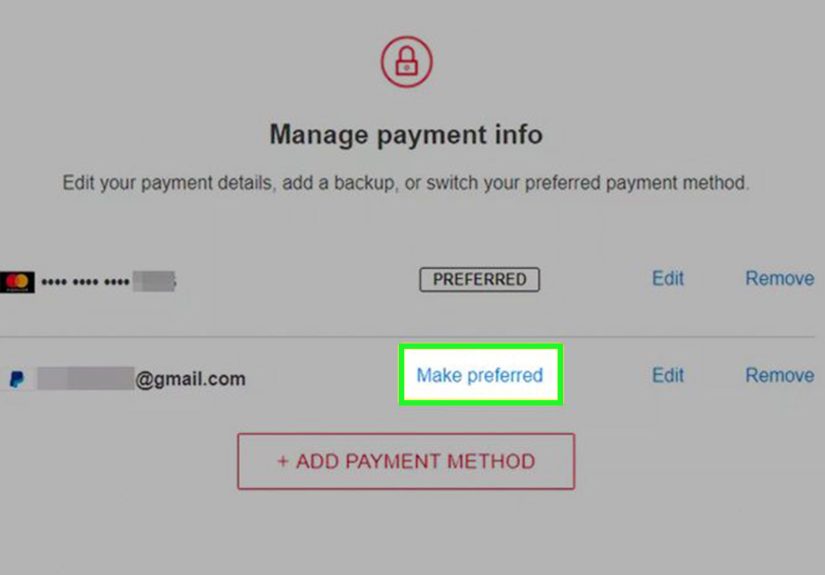
Select your profile icon, then open Account. Look for the billing or membership section. From there, choose Manage payment info or a similar payment management option.
Step 3: Add PayPal as a payment method
Select Add Payment Method. If PayPal is available for your account, you should see it listed as an option. Choose PayPal, then continue to the PayPal sign-in page. You may be asked to confirm your PayPal email, password, and preferred funding source.
Step 4: Confirm the billing agreement
PayPal will ask you to approve Netflix as a merchant that can charge you automatically. This is normal for subscriptions. Read the details before accepting. Once you approve, PayPal sends you back to Netflix, where PayPal should appear as one of your payment methods.
Step 5: Make PayPal your preferred Netflix payment method
If Netflix shows multiple payment methods, choose PayPal as the preferred option. Netflix may use backup payment methods only if your preferred method fails, depending on what payment methods are eligible in your region.
Why Direct PayPal Billing Is Useful
Direct PayPal billing is helpful because it keeps your card number away from Netflix while still letting you pay automatically. You can update the card or bank behind PayPal later without re-entering card details on Netflix. That is especially useful if your card expires, your bank sends a replacement, or you simply want your Netflix charge to come from a different card next month.
It also gives you a central place to review recurring payments. Inside PayPal, Netflix should appear under automatic payments, subscriptions, or saved businesses. From there, you can view the billing agreement, change the funding source, or stop paying with PayPal if needed.
Here is the part people often miss: changing your general “preferred” payment method in PayPal does not always change the payment source used for existing subscriptions. For automatic payments, you may need to open the Netflix merchant agreement inside PayPal and update the payment method there. This tiny detail has caused many people to stare at their bank statement like it just betrayed them in a courtroom drama.
Method 2: Buy a Netflix Gift Card with PayPal and Redeem It
The second simple way is to use PayPal to buy a Netflix gift card, then redeem the gift card on your Netflix account. This method is great if you prefer prepaid billing, want to give Netflix as a gift, or want better control over how much you spend.
Netflix gift cards work like account credit. Once redeemed, the balance is applied to your Netflix account and used toward your subscription. If the balance is not enough to cover a full billing cycle, Netflix may use another payment method on file for the remaining amount, depending on your account setup.
Step 1: Buy a Netflix gift card from a trusted retailer
Choose a reputable retailer that sells Netflix gift cards and accepts PayPal. Depending on availability, this may include major online gift card marketplaces, retail stores, or digital gift card platforms. Avoid suspicious websites offering “discounted Netflix accounts,” “lifetime Netflix,” or gift cards that are dramatically cheaper than face value. If it smells like a scam wearing a fake mustache, it probably is.
Step 2: Pay with PayPal at checkout
At checkout, select PayPal as your payment method. Log in to PayPal and choose the funding source you want to use. Confirm the purchase only after checking the amount, retailer name, delivery email, and gift card value.
Step 3: Find your Netflix gift card code
For digital gift cards, the code usually arrives by email. For physical cards, the code may be printed on the back under a scratch-off area. Keep this code private. Anyone who has it may be able to redeem the balance.
Step 4: Redeem the gift card on Netflix
Go to Netflix’s gift card redemption page, sign in to the correct Netflix account, and enter the code. Once accepted, the gift card balance is added to your account. Netflix will use that balance before charging your preferred payment method.
Which Method Should You Choose?
Choose direct PayPal billing if you want convenience
Direct PayPal billing is best if you want your Netflix subscription to renew automatically every month. It is simple once configured, and you can manage the underlying funding source inside PayPal. This is the “set it and forget it” method, although you should still review your subscriptions now and then. Even autopay deserves a little adult supervision.
Choose a Netflix gift card if you want spending control
A Netflix gift card is best if you want to prepay a specific amount. This can help if you are budgeting, avoiding surprise charges, gifting Netflix to someone, or using PayPal without creating a long-term PayPal billing agreement with Netflix.
Gift cards are also handy when a card is declined or when you do not want to store a credit or debit card directly on your Netflix account. However, gift card availability and redemption rules may vary. Always buy from trusted sellers and redeem only through Netflix’s official website.
How Netflix Billing Works with PayPal
Netflix charges members once per billing cycle, usually on the date they signed up or restarted membership. If you use PayPal directly, Netflix sends the charge to PayPal. PayPal then uses the funding source attached to that automatic payment agreement.
If you have a Netflix gift card balance, Netflix normally uses that balance first. After the balance runs out, Netflix may charge your preferred payment method unless you cancel or add another gift card. This makes gift cards useful for short-term budgeting, but you should still check your account page so you know what happens when the balance reaches zero.
For example, suppose your Netflix plan costs $15.49 per month and you redeem a $25 gift card. Netflix applies the gift balance to the next bill, leaving some credit for the following cycle. When the remaining balance is not enough to cover the next full bill, Netflix may charge the rest to your preferred payment method if one is available.
How to Update the Card or Bank Used by PayPal for Netflix
If Netflix is already charging your PayPal account, and you want to change the card, bank, or balance source behind it, do not only change your general preferred PayPal payment method. Instead, go into PayPal’s automatic payments or subscriptions section.
Look for Netflix as a merchant. Open the Netflix billing agreement, then select the option to change the payment method. Choose a new linked card, bank account, or eligible PayPal balance option, then save the change. This helps prevent the classic “Why did PayPal charge that old card?” mystery, which is slightly less entertaining than a true-crime series but equally stressful.
Common Problems and Easy Fixes
PayPal does not appear on Netflix
If PayPal does not appear as a Netflix payment option, it may not be available for your account, location, plan, or billing setup. You may also be billed through a partner, such as a mobile provider, internet provider, or entertainment package. In that case, payment changes may need to be handled through the partner instead of Netflix.
Netflix says there is a problem with the payment method
Check whether your PayPal account is active, verified, and connected to a valid funding source. Make sure your card has not expired, your bank is not blocking the charge, and your PayPal automatic payment agreement with Netflix is still active.
Your PayPal balance was not used
PayPal may use the funding source assigned to the Netflix automatic payment agreement. If you want PayPal balance used first, review the Netflix automatic payment settings in PayPal and check the selected payment source. Settings can differ between one-time payments and recurring payments.
You bought a gift card, but Netflix will not accept it
Make sure the code was entered correctly. Watch for similar characters, extra spaces, or missing digits. Also confirm that the gift card is valid for your country and account. If the card came from a retailer, keep your receipt or email confirmation in case support needs proof of purchase.
Security Tips Before Paying Netflix with PayPal
Because Netflix and PayPal are popular brands, scammers love pretending to be both. Be careful with emails or text messages claiming your Netflix payment failed and urging you to click a link immediately. Real account changes should be made by going directly to Netflix or PayPal in your browser or app, not through random links in messages.
Use a strong password for both Netflix and PayPal. Turn on two-factor authentication for PayPal. Check your PayPal automatic payments every few months and remove old merchants you no longer use. If something looks wrong, open PayPal directly and review your activity instead of clicking links from an email.
Also, never buy “shared Netflix accounts” from strangers. You are not buying a deal; you are buying future frustration with a side of password chaos. Stick with official Netflix billing, trusted gift cards, or legitimate partner packages.
Real-World Experience: What It Feels Like to Pay Netflix with PayPal
In practice, paying Netflix with PayPal is usually smoother than people expect. The direct method feels like paying for any other subscription: sign in, authorize PayPal, confirm, and move on with your evening. The only moment that deserves extra attention is the PayPal approval screen. That is where you should slow down and check which funding source will be used.
A common experience is setting PayPal up once and then forgetting about it for months. That is both the beauty and the danger of automatic payments. It is beautiful because your Netflix access continues without drama. It is dangerous because old subscriptions can become invisible. One day you review your PayPal activity and realize Netflix has been quietly charging a card you meant to reserve for groceries, gas, or emergencies. Not a disaster, but definitely a “talking to yourself in the kitchen” moment.
The gift card method feels different. It gives you a stronger sense of control because you decide the amount upfront. For budget-conscious users, this can be surprisingly satisfying. Instead of leaving a subscription open-ended, you load a specific balance and let Netflix use it month by month. It feels like putting snacks in a jar: when the jar is empty, you know exactly what happened. No financial jump scares.
Gift cards are especially useful for students, families, and anyone who likes prepaid entertainment. Parents may prefer buying a Netflix gift card instead of sharing a card or PayPal login. Friends may use a gift card as a practical present. Someone who is testing Netflix for a short period may prefer a gift card because it creates a natural stopping point when the balance runs out.
However, gift cards are not perfect. You must buy them from trustworthy sellers, keep the code safe, and redeem them on the right account. Accidentally redeeming a card on the wrong Netflix profile or household account can create a tiny soap opera. The code usually applies to the account you are signed into, so double-check before clicking redeem. Future you will appreciate the extra five seconds of caution.
Another real-world lesson: keep your PayPal receipts. If Netflix support ever needs to verify a payment made through PayPal, your PayPal invoice ID or billing ID may matter. You can usually find these details in PayPal activity, PayPal email receipts, or the automatic payments section. It is not something you need every day, but when you need it, you really need it.
People who switch cards often should pay close attention to PayPal automatic payment settings. A new preferred card in your PayPal wallet does not always rewrite every subscription agreement. Netflix may continue using the card attached to the original automatic payment. So if you change banks, cancel a card, or start using a rewards card, open the Netflix agreement inside PayPal and update it directly.
For most users, the best setup is simple: use direct PayPal billing if Netflix is a long-term subscription, and use gift cards if you want prepaid control. Direct PayPal is the comfy couch. Gift cards are the envelope budgeting system. Both get you to the same destination: pressing play without hunting for your wallet.
Final Thoughts
Paying for a Netflix account with PayPal is easy when you understand the two main routes. The first way is to add PayPal directly to your Netflix account and let it handle monthly billing automatically. The second way is to buy a Netflix gift card with PayPal and redeem the balance on your Netflix account.
For convenience, direct PayPal billing wins. For budgeting and prepaid control, Netflix gift cards are hard to beat. Whichever method you choose, use official websites, trusted retailers, strong passwords, and careful payment settings. That way, the only surprise in your evening is the plot twist, not the payment method.