Table of Contents >> Show >> Hide
- Why Viewing Your Highest Rated Films Matters
- How to View Your Highest Rated Films on Letterboxd in 13 Steps
- Step 1: Sign in to your Letterboxd account
- Step 2: Go to your profile
- Step 3: Open the Films section
- Step 4: Make sure rated films are visible
- Step 5: Open the Sort by menu
- Step 6: Choose Your Rating
- Step 7: Select Highest First
- Step 8: Use the rating filter to isolate only your top scores
- Step 9: Add genre, decade, or release filters for a smarter view
- Step 10: Check your Diary if you want context, not just scores
- Step 11: If a favorite is missing, confirm that you actually rated it
- Step 12: Understand how re-ratings affect what you see
- Step 13: Save the view mentally, or use Stats and yearly summaries for deeper insights
- Common Reasons Your Highest Rated Films Look Wrong
- Best Tips for Keeping Your Top-Rated Films Easy to Find
- The Experience of Finally Seeing Your Highest Rated Films All in One Place
- Conclusion
If you use Letterboxd the way many movie lovers do, your account is part diary, part scorecard, part accidental personality test. One minute you are calmly rating a classic drama four and a half stars. The next minute you are giving a chaotic shark movie the same rating because, frankly, cinema is a wide and mysterious ocean. Sooner or later, curiosity hits: how do you actually view your highest rated films on Letterboxd without manually squinting through your whole profile like a detective in a trench coat?
The good news is that Letterboxd makes this pretty easy once you know where the right controls live. The slightly less good news is that the difference between watched, logged, liked, and rated can make your account feel like it was designed by film students who also enjoy puzzle rooms. But once you understand the system, finding your top-rated movies becomes fast, useful, and weirdly satisfying.
This guide walks you through exactly how to view your highest rated films on Letterboxd in 13 clear steps. It also explains why some titles might not appear where you expect, how re-ratings work, and how to use filters to turn your profile into a much cleaner view of your movie taste. If you have ever wondered whether your account says “serious cinephile” or “person who gives five stars to comfort watches and refuses to apologize,” you are in the right place.
Why Viewing Your Highest Rated Films Matters
Before we jump into the steps, it helps to know why this feature is so useful. Seeing your highest rated films on Letterboxd is not just a vanity exercise for people who want proof that they gave The Godfather five stars and therefore have “good taste.” It is also practical.
When you sort by your rating, you can quickly build favorites lists, compare your strongest opinions across years or genres, and spot patterns in your viewing habits. You may notice that your top scores lean heavily toward science fiction, screwball comedies, animated films, or movies where someone stares thoughtfully out of a rainy window for two hours. That kind of pattern is useful whether you are making a recommendation list, planning a rewatch month, or simply trying to understand your own movie brain.
It also helps with cleanup. Sometimes you think a film is missing from your best-rated pile, only to realize you marked it as watched, liked it, or logged it without assigning a star rating. Letterboxd is organized, but it expects you to be organized too. That is a bold assumption, and yet here we are.
How to View Your Highest Rated Films on Letterboxd in 13 Steps
-
Step 1: Sign in to your Letterboxd account
This sounds obvious, but it matters because the tools that sort films by your rating depend on your own account data. Open the Letterboxd website in your browser or launch the app on your phone, then sign in.
If you are using the app, make sure it is updated. Letterboxd’s mobile apps support sorting and filtering, and newer versions generally make these controls easier to find.
-
Step 2: Go to your profile
Once you are signed in, head to your profile page. On the web, click your avatar or username. In the app, tap your profile icon. Your profile is the home base for your films, diary, reviews, lists, likes, tags, network, and stats.
If Letterboxd is your cinematic living room, this is the couch where all your questionable rating decisions are stored.
-
Step 3: Open the Films section
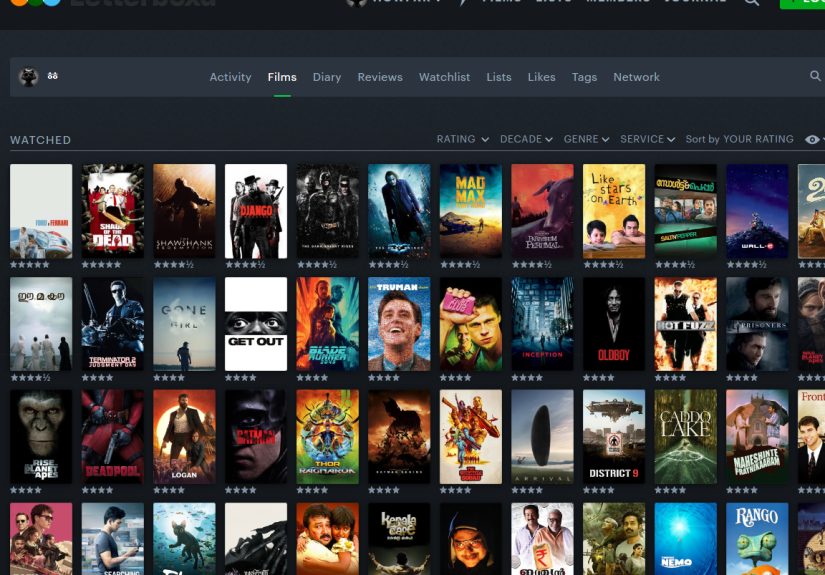
From your profile, click or tap Films. This is the most useful starting point for viewing everything you have watched while also giving you access to sorting and filtering controls.
Many users assume they need a separate ratings screen first, but the Films view is often the fastest way to reach the exact result you want because it combines your watched titles with sort options like Your Rating and rating-range filters.
-
Step 4: Make sure rated films are visible
Inside the Films view, look at the filters. Letterboxd lets you show or hide rated films, logged films, reviewed films, watchlist titles, and more. If you want to see your highest rated movies, you obviously need rated films turned on.
If your page looks strange, or if titles seem to be missing, check whether a filter is hiding rated entries by accident. A mysterious missing masterpiece is often just a filter problem, not a cosmic injustice.
-
Step 5: Open the Sort by menu
Now find the Sort by controls. On the web, this usually appears alongside filtering options. In the app, it may appear as a sort control or menu icon inside your films collection.
Letterboxd offers several sort options, including film name, popularity, release date, average rating, film length, and most importantly here, Your Rating.
-
Step 6: Choose Your Rating
In the sort menu, select Your Rating. This is the key move. Do not pick Average Rating unless you want Letterboxd’s community consensus. That option shows what everybody thinks. Your Rating shows what you think, which is the whole point.
This distinction matters a lot. If you sort by average rating, a universally adored classic may float to the top even if you gave it three stars and a polite emotional shrug.
-
Step 7: Select Highest First
After choosing Your Rating, select Highest First. This will push your top-scored titles to the top of the page. If you use the full five-star scale, your five-star films should appear first, followed by four-and-a-half-star films, then four-star films, and so on.
At this point, you have done the core task. Congratulations. The red carpet can now be rolled out for your favorite movies and your most dramatic overreactions.
-
Step 8: Use the rating filter to isolate only your top scores
If you want an even cleaner view, use Letterboxd’s rating filter or rating range. This lets you narrow the page to only films you rated five stars, four and a half stars and up, or any custom star band you want.
This is especially useful if your account is large. Sorting is great, but filtering is better when you do not want to scroll past eighty-seven titles you rated four stars during your “I am being generous this month” era.
-
Step 9: Add genre, decade, or release filters for a smarter view
Once your highest rated films are visible, you can refine them further. Letterboxd’s filters can help you answer more specific questions like:
What are my highest rated horror films? Which 1990s movies did I rate the best? What are my top-rated animated titles? Why do I apparently think every moody science-fiction film deserves four and a half stars minimum?
This step turns a simple ratings list into something genuinely useful for discovery, list-making, and self-analysis.
-
Step 10: Check your Diary if you want context, not just scores
Your Films page is the best place to sort by rating, but your Diary gives useful context. If you want to remember when you watched a movie, whether it was a rewatch, or what mood you were in when you slapped five stars on it at 1:14 a.m., your Diary is the better companion view.
This matters because Letterboxd separates “watched” from “logged.” A watched film tells the platform you have seen it at some point. A logged film records a specific viewing date and builds your Diary history.
-
Step 11: If a favorite is missing, confirm that you actually rated it
This is one of the biggest Letterboxd gotchas. You may have liked a film, marked it watched, or logged it without giving it a star rating. If so, it will not behave like a rated title in your sorted view.
Open the film’s page and check whether a star rating is attached. If not, add one. Letterboxd lets you rate from the film page, when logging a diary entry, or through actions on the poster. A heart is not a star, and a watched eye is definitely not a star. Letterboxd is very polite about this, but it is firm.
-
Step 12: Understand how re-ratings affect what you see
If you rewatch a film and change your score, Letterboxd does not rewrite every old diary entry to match the new rating. Older diary-entry ratings stay attached to those past entries. Your latest rating updates the film’s current default rating, which is what usually powers your general “highest rated” sorting view.
So if a title looks out of place, you may not be misremembering. You may simply have changed your mind over time. Which, to be fair, is one of the most honest things a movie lover can do.
-
Step 13: Save the view mentally, or use Stats and yearly summaries for deeper insights
Once you have your highest rated films on screen, you can use that view to build lists, compare decades, or decide what deserves a rewatch. If you have Letterboxd Pro, the Stats pages add even more perspective, including all-time and annual views of your film activity.
If you want a year-by-year snapshot, Letterboxd also offers personal yearly summaries in the app. That will not replace the Films sorting view, but it can help you see which ratings defined a specific year of watching. Think of it as your cinematic report card, minus the stress and plus more subtitles.
Common Reasons Your Highest Rated Films Look Wrong
You marked a film as watched, but never rated it
This is probably the most common reason a movie is absent. Watching and rating are separate actions on Letterboxd, even though rating a film can also mark it as watched.
You liked a film, but did not assign stars
Hearts and stars are different. A like tells Letterboxd you enjoyed the film. A rating tells Letterboxd how much. If you want the title to appear in your highest rated movies, it needs stars.
You are looking at average ratings instead of your ratings
This happens all the time. Make sure the sort order is set to Your Rating, not Average Rating.
Your older diary entries still show old scores
If you changed your mind on a rewatch, your current default score may differ from historical diary entries. That is normal. Letterboxd preserves old logs instead of rewriting your cinematic past like a tiny time machine.
Best Tips for Keeping Your Top-Rated Films Easy to Find
Rate films consistently. Use the same general logic for stars, even if your logic is “five stars means I would defend this movie in a parking lot.” Log important rewatches so you can track how your opinion changes. And when you really want a neat personal canon, create a list from your top-rated titles instead of relying only on a temporary sorted view.
That last point matters because sorting is great for discovery, but lists are better for presentation. A sorted page says, “Here is my current taste.” A curated list says, “Here is my taste, but dressed up for company.”
The Experience of Finally Seeing Your Highest Rated Films All in One Place
There is a very specific feeling that comes from seeing your highest rated films lined up together on Letterboxd for the first time, and it is part pride, part confusion, part accidental self-discovery. It feels a little like opening a time capsule that you packed yourself, except instead of old letters and childhood photos, it is a row of movie posters quietly exposing every phase of your personality.
At first, it is exciting. You expect to see your absolute favorites gathered neatly at the top like honored guests at a classy awards ceremony. The masterpieces are there. The comfort rewatches are there. The deeply emotional drama you still think about on random Tuesdays is there too. You feel understood. Seen. Validated. Your taste has shape.
Then the surprises start. Maybe one of your top-rated movies is a totally sincere classic, and the next one is a weird action sequel you watched while eating leftover pizza and somehow loved with your entire heart. Maybe you realize your highest rated films are not the “best” films in a strict academic sense but the movies that hit you at exactly the right moment. That is one of the most revealing things about Letterboxd. Your top-rated list is not just a record of quality. It is a record of timing, mood, memory, and personal history.
You start remembering where you were when you watched them. One film reminds you of a lazy winter weekend. Another reminds you of a packed theater where the audience laughed in perfect unison. Another was a rewatch after a hard week, and suddenly your rating makes complete emotional sense. The list becomes less about ranking and more about autobiography. It is your life in film, which is exactly why Letterboxd works so well for so many people.
There is also something unexpectedly useful about seeing patterns emerge. Maybe your highest rated films lean toward intimate character dramas, old noirs, smart comedies, or giant emotional epics with huge scores and bigger feelings. Once you notice those patterns, it becomes easier to find new movies you might love. Your own ratings become recommendation data, but the kind that actually knows you. Not an algorithm that thinks one superhero movie means you want forty more forever. You.
And yes, there is always one title in the mix that makes you pause and laugh. The oddball favorite. The movie that critics shrugged at but you adored. The one that makes your list feel personal instead of performative. That is the moment the feature goes from useful to delightful. You are not just viewing a sorted group of films. You are seeing your taste become visible.
That is why learning how to view your highest rated films on Letterboxd is such a satisfying little skill. It is practical, sure. It helps you organize your profile, build lists, and revisit your favorites. But it also gives you a clearer picture of who you are as a viewer. And for movie lovers, that is half the fun. The other half is arguing with yourself over whether that one movie really deserved five stars. Spoiler: it probably did at the time, and honestly, that counts.
Conclusion
If you want to view your highest rated films on Letterboxd, the fastest method is simple: go to your profile, open Films, sort by Your Rating, and choose Highest First. From there, you can use rating filters, genre filters, decade filters, and diary context to get a cleaner and more useful look at your movie taste.
The real trick is understanding how Letterboxd organizes your activity. Watched is not the same as logged. Liked is not the same as rated. Old diary ratings are not always your current default score. Once those details click, your profile becomes much easier to navigate.
And when you finally see your highest rated films all together, do not be surprised if the result is equal parts elegant and embarrassing. That just means your account is alive, honest, and doing exactly what it is supposed to do.