Table of Contents >> Show >> Hide
- What “Online” on WhatsApp Actually Means
- Step 1: Open Your Chat With the Person
- Step 2: Check for “Last Seen” if They Are Not Currently Online
- Step 3: Use Read Receipts and Message Status Carefully
- Step 4: Understand Privacy Settings Before You Assume Anything
- Can You Tell if Someone Is Online on WhatsApp Without Opening the Chat?
- Does “Online” Mean They Saw My Message?
- Can Third-Party Apps Track WhatsApp Online Status?
- Examples of How to Read WhatsApp Activity Correctly
- Mistakes People Make When Checking WhatsApp Online Status
- Final Thoughts
- Real-World Experiences and Practical Situations
Trying to figure out whether someone is online on WhatsApp can feel oddly dramatic for something that happens inside a tiny green app. One minute you are casually checking a message. The next minute you are acting like a digital detective, squinting at the top of a chat and wondering whether “online” means “available,” “ignoring me,” or “accidentally opened the app while looking for a meme.”
The good news is that WhatsApp actually gives you a few built-in clues. The less fun news is that those clues are limited by privacy settings, device behavior, and the universal human habit of reading messages and then vanishing like a magician. In other words, yes, you can tell if someone is online on WhatsApp sometimes, but no, it is not a crystal ball.
In this guide, you will learn the four practical steps for checking someone’s WhatsApp online status, what each signal really means, what it does not mean, and how to avoid jumping to dramatic conclusions based on one lonely gray checkmark. We will also cover WhatsApp privacy settings, read receipts, last seen, and common mistakes people make when trying to tell if someone is active.
What “Online” on WhatsApp Actually Means
Before jumping into the steps, let’s clear up the biggest misunderstanding. On WhatsApp, the word online usually means the person currently has WhatsApp open on their device and is connected to the internet. That is it. It does not automatically mean they are reading your message. It does not guarantee they saw your chat. And it definitely does not mean they are sitting there waiting to reply with the speed of a customer support bot.
WhatsApp can also show last seen, which refers to the last time that person used WhatsApp. But here is the twist: users can limit who sees their last seen and online status. So if you do not see anything under their name, the reason could be simple privacy settings rather than a dramatic block, cold shoulder, or social catastrophe.
Step 1: Open Your Chat With the Person
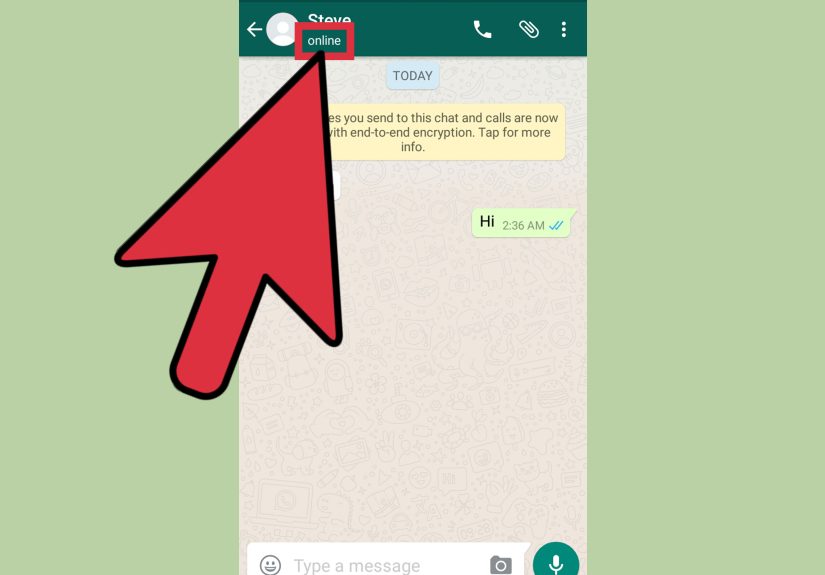
The easiest way to tell if someone is online on WhatsApp is to open your direct chat with them. This is where the app usually displays presence information most clearly. If the person is actively using WhatsApp and their settings allow it, you may see the word online under their name at the top of the conversation.
What to Look For
At the top of the chat, beneath the contact’s name, you may see one of several indicators:
Online means the app is open on their device right now.
Typing… means they are actively composing a message in that conversation.
Recording audio… means they are making a voice message.
Last seen today at 3:42 PM or something similar means they were on WhatsApp at that earlier time.
If you see online, congratulations, mystery solved. They are on WhatsApp at that moment. Whether they are reading your message, chatting with someone else, or staring at the app while deciding what snack to order is another question entirely.
Why This Step Matters
This is the most direct way to check WhatsApp online status. You do not need a third-party tracker, a shady browser extension, or the technological ethics of a cartoon villain. The official app itself is the best place to look.
Step 2: Check for “Last Seen” if They Are Not Currently Online
If the person is not online when you open the chat, the next clue is last seen. This can help you estimate whether they were active recently. For example, if WhatsApp says last seen today at 9:15 AM, you know they had the app open at that time.
What Last Seen Can Tell You
Last seen is useful because it gives a rough sense of recency. If you sent a message at 9:10 AM and the contact shows last seen today at 9:15 AM, there is a reasonable chance they opened WhatsApp after your message was sent. That still does not prove they opened your chat, but it does tell you they were active in the app.
This is where many people get carried away. “They were last seen five minutes ago and still did not reply” is not evidence of anything except that life exists outside your chat window. They may have opened WhatsApp to answer a work message, clear a notification, or send a photo of a dog wearing sunglasses. Context matters.
When Last Seen Is Missing
If you cannot see a last seen timestamp, there are a few possible reasons:
The person turned off last seen and online visibility.
You changed your own privacy settings and can no longer see theirs.
The person blocked you.
You are not in the audience allowed to see their status.
They simply are not online and do not share last seen publicly.
That means a missing last seen is a clue, not a verdict. Think of it as digital fog, not a courtroom confession.
Step 3: Use Read Receipts and Message Status Carefully
If you are trying to tell whether someone is active on WhatsApp, message checkmarks can add context. They are not the same as online status, but they help build a more complete picture.
What the Checkmarks Mean
One gray checkmark means your message was sent from your device.
Two gray checkmarks mean the message was delivered to the recipient’s device.
Two blue checkmarks usually mean the message was read, assuming read receipts are turned on.
If you see two blue checkmarks, the person likely opened your message, even if you never caught them showing as online. If you see two gray checks but no blue, the message reached them, but they may not have opened it yet. Or they read it from a notification preview. Or they turned off read receipts. WhatsApp loves a little ambiguity, apparently.
Why This Is Only a Supporting Clue
Read receipts are separate from online presence. Someone can be online without opening your chat. They can also read your message without appearing online at the exact moment you check. That is why the smartest approach is to combine signs rather than obsess over a single one.
Step 4: Understand Privacy Settings Before You Assume Anything
This step is the one most people skip, which is why confusion spreads faster than a family group chat rumor. WhatsApp gives users strong control over who can see their last seen and online status. So if you cannot tell whether someone is online, the app may be doing exactly what that person wants it to do.
How Privacy Settings Affect Visibility
WhatsApp users can choose who sees their activity indicators. Depending on the current settings available in the app, a person may share their last seen and online status with everyone, only contacts, selected contacts, or nobody. In some cases, if someone hides their own last seen and online status, they may also lose the ability to see yours.
This means two things. First, your inability to view someone’s status may have nothing to do with you personally. Second, any article claiming you can always tell if someone is online on WhatsApp is overselling it like a late-night infomercial for a blender that also “changes your life.”
Common Reasons You Cannot See Someone Online
If WhatsApp is not showing someone as online, here are the most common explanations:
They are not using WhatsApp right now.
They disabled last seen or online visibility.
Their settings only allow contacts to view status, and you are not included.
You changed your own privacy settings and lost visibility.
You may have been blocked, though this is never proven by status alone.
Can You Tell if Someone Is Online on WhatsApp Without Opening the Chat?
Usually, not reliably. Unlike some messaging apps that show a bright green dot next to a profile picture, WhatsApp does not always make online presence obvious from the chat list alone. The most reliable place to check is inside the conversation itself.
There may be limited indicators in some views or future app changes, especially in certain group chat scenarios, but for one-on-one chats, the standard method is still opening the conversation and checking beneath the contact’s name.
Does “Online” Mean They Saw My Message?
No. This is probably the most important reality check in the entire article. A person can be online and still not open your chat. They may be talking to someone else, checking archived messages, changing settings, or just wandering through the app like the rest of us wander through streaming menus without picking anything to watch.
If you want stronger evidence that they saw your message, read receipts are more useful than the online label. Even then, read receipts can be disabled in many chats, so there is still no perfect system.
Can Third-Party Apps Track WhatsApp Online Status?
You may see apps or services promising to track someone’s WhatsApp activity, log when they come online, or tell you exactly when they go offline. That is a bad idea for both privacy and security reasons. These tools are often unreliable, intrusive, or risky. Some may violate terms of service, and others may simply exist to harvest data, flood you with ads, or encourage creepy behavior with a dashboard.
The safest and most ethical method is to use the signals WhatsApp itself provides: online, last seen, typing, and message status. If the app does not show you more, that limitation is intentional.
Examples of How to Read WhatsApp Activity Correctly
Example 1: You See “Online”
You open the chat and see online under the contact’s name. That means they have WhatsApp open right now. It does not confirm they are in your conversation.
Example 2: You See “Last Seen Today at 8:47 PM”
This tells you they were using WhatsApp at 8:47 PM. It does not tell you which messages they opened or whether they saw yours.
Example 3: No Online or Last Seen Appears
That could mean privacy settings are hiding their status. It could also mean they blocked you, but that conclusion requires additional signs and still is not guaranteed.
Example 4: Two Blue Checkmarks, but You Never Saw Them Online
They read your message. You simply did not catch them while the app displayed them as online. Timing matters.
Mistakes People Make When Checking WhatsApp Online Status
One classic mistake is assuming missing status equals blocking. Another is treating last seen like a lie detector. A third is refreshing the chat every ten seconds as though WhatsApp will eventually award you a medal for persistence. It will not.
The better approach is to understand how WhatsApp status indicators work, accept their limits, and avoid overinterpreting them. Technology can show presence. It cannot read intention, emotion, or whether the other person started typing and then got distracted by dinner.
Final Thoughts
If you want to tell if someone is online on WhatsApp, the process is pretty straightforward. Open the chat, look for online, check last seen if needed, use message checkmarks as supporting evidence, and keep privacy settings in mind before drawing conclusions. That is the practical, accurate method.
The short version is this: WhatsApp gives you clues, not complete surveillance. And honestly, that is probably for the best. The app is designed to balance communication with privacy, which means you can often tell when someone is active, but not always, and never with perfect certainty.
So yes, you can learn how to tell if someone is online on WhatsApp in four easy steps. Just try not to let those steps turn into a full-time hobby.
Real-World Experiences and Practical Situations
Here is where the topic becomes more human and less technical. In real life, people rarely check WhatsApp status out of pure scientific curiosity. Usually, there is a story behind it. Maybe a coworker has not replied to an urgent message. Maybe a friend said they would send an address and then disappeared. Maybe someone is waiting for a crush to answer and is pretending they are “just checking the app for normal reasons.” Sure. Very normal reasons.
One common experience happens in work chats. Imagine you send a message to a colleague asking for a document before a deadline. You open the chat and see they are online. Naturally, your brain says, “Great, they are seeing this right now.” But five minutes later, nothing. In that situation, the online label only tells you the app is open. Your coworker may be answering someone else, in a group thread, or opening WhatsApp to send a quick file to another teammate. This is why experienced WhatsApp users learn not to treat the online indicator as a personal promise.
Another very common experience involves family chats. A parent might send a message like, “Did you get home?” and then notice that the child was online ten minutes ago. Panic begins. But the simpler explanation is often the right one. The message may have been missed, previewed without being opened, or buried under ten other notifications and one photo of a cat wearing a birthday hat. In family communication, the best lesson is to use WhatsApp clues as indicators, not conclusions.
Then there is the classic friendship scenario. You send a funny message. You see your friend online several times. Still no reply. The temptation is to assume the worst. But in reality, many people open WhatsApp to check group messages, respond to urgent chats, or glance at notifications when they do not have time for a full conversation. A delayed reply is often more about timing and energy than about the relationship itself. WhatsApp status can reveal activity, but it cannot explain priorities.
People also run into confusion when they change their own privacy settings. Someone may hide their last seen to get more privacy and then suddenly realize they cannot view other users’ status the way they used to. That leads to the mistaken belief that the other person changed something, when the real change happened on their own account. This is a surprisingly common experience, and it shows why understanding WhatsApp privacy controls matters just as much as checking the app.
Perhaps the most useful real-world takeaway is this: the healthiest way to use WhatsApp status is as a light communication signal, not a surveillance tool. It can help you decide whether now is a good time to send a follow-up, whether someone was recently active, or whether a message may have been read. But it should not be used to build dramatic theories from incomplete information. In other words, check the status, gather the clue, and then let your imagination take a small nap.