Table of Contents >> Show >> Hide
- What’s New in Instagram DMs Right Now?
- How Instagram Message Editing Works
- Pinning Chats: Because Important Conversations Shouldn’t Sink
- Beyond Editing and Pinning: The New DM Superpowers
- Why Instagram Is Betting Big on DMs
- Best Practices: Using Message Editing and Pinning Wisely
- Potential Downsides and Things to Watch
- Real-World Experiences with Instagram’s New DM Features
- Conclusion: Instagram DMs Are Growing Up
If you’ve ever sent a DM on Instagram, stared at an embarrassing typo, and immediately considered moving to another country… good news. Instagram finally heard our collective scream-into-the-pillow moment.
After years of “oops, wrong person” and “I swear that was autocorrect,” Instagram now lets you edit direct messages, with more powerful DM features like chat pinning, scheduled messages, and pinned in-chat content rolling out as part of a broader messaging overhaul.
Behind the scenes, Meta has been quietly turning Instagram DMs into a full-on messaging hub to compete with iMessage, WhatsApp, and every other app you’re juggling. Over the last year, Instagram has shipped more than 20 new DM features, and it’s very clear: the app no longer thinks of DMs as a side quest they’re the main storyline.
Let’s break down what’s new, how to use it, and how these changes can actually make your daily chat chaos a little more manageable (and a lot less “sent too fast”).
What’s New in Instagram DMs Right Now?
Instagram has rolled out (or is actively rolling out) a bundle of DM upgrades. The headline features are:
- Edit messages for up to 15 minutes after sending.
- Pin up to three chats to the top of your inbox so your favorite people and important threads don’t get buried.
- Toggle read receipts on or off for all chats or specific conversations.
- Favorite stickers and access an upgraded sticker tray, plus new themes to customize chats.
- Reply with more creative formats like photos, videos, voice messages, GIFs, and stickers directly in-thread.
- Schedule messages up to 29 days in advance and pin conversations in a more flexible way, with additional features like translations and music sharing coming online in 2025.
- Pin specific content inside chats, keeping your favorite memes or crucial info fixed at the top of the thread.
That’s a lot of power in one inbox. But the star of the show the thing people have begged for is message editing.
How Instagram Message Editing Works
Fixing Typos (and Regrets) Within 15 Minutes
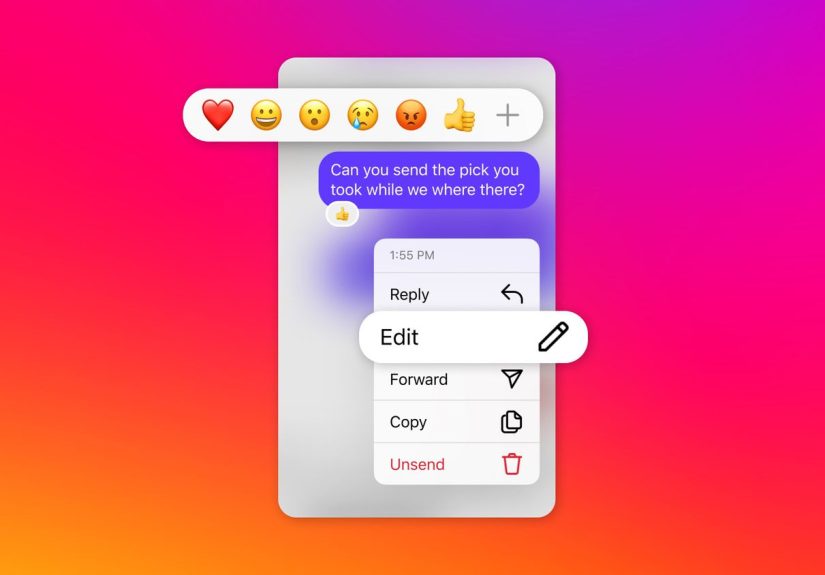
Instagram’s edit feature is simple by design: you get a short window to fix your message, not rewrite history.
Here’s how to edit a DM on Instagram:
- Press and hold the message you want to fix.
- In the menu that pops up, tap “Edit”.
- Make your changes, hit Send again, and your updated message appears in the conversation with a small “Edited” label so everyone knows it’s been modified.
You can do this for up to 15 minutes after sending a message. After that, what you wrote is locked in which is probably good for humanity and your future self.
What You Can’t Do with Editing
While editing is powerful, there are limitations (no, you can’t send a spicy message, edit it into “hi :)” two hours later, and pretend nothing happened):
- No edit history: Recipients can see that the message was edited, but not the previous versions.
- Short time window: That 15-minute cap keeps editing focused on typos, missing details, and quick clarifications not long-term revisionist storytelling.
- Still subject to screenshots: If someone screenshotted the original message, editing won’t erase it from their camera roll.
In other words, editing is here to save you from clumsy thumbs, not bad decisions.
Pinning Chats: Because Important Conversations Shouldn’t Sink
How Chat Pinning Works
Alongside message editing, Instagram is introducing the ability to pin up to three chats at the top of your inbox. Think of it as your “VIP list” of conversations.
To pin a chat:
- On mobile: Swipe left on a conversation or press and hold it, then tap “Pin”.
- To unpin, repeat the action and tap “Unpin”.
Once pinned, those chats stay glued to the very top, no matter how many new messages you get from group chats that never sleep.
Pinning Messages and Content Inside Chats
Instagram is also expanding pinning to work inside chats. You can pin specific messages or content like directions, an event date, or that one meme everyone keeps asking you to resend so it appears as a banner in the conversation and doesn’t vanish into the scroll.
This is especially useful for:
- Group trips: Pin the hotel address or flight details so no one has to ask for the fifth time.
- Work or school projects: Pin deadlines or instructions so they don’t get buried under reaction GIFs.
- Creators & small businesses: Pin collaboration details, discount codes, or key messages for clients.
Not all accounts see every pinning option at the same time Meta often rolls these features out gradually and sometimes to professional accounts first.
Beyond Editing and Pinning: The New DM Superpowers
Scheduled Messages for Future You
Instagram is also rolling out the ability to schedule DMs. You can write a message now and have Instagram send it later up to 29 days in advance.
Think about what that enables:
- Send a birthday DM that lands right at midnight without staying awake.
- Remind a client about a meeting the day before, automatically.
- Drop a campaign teaser to followers at the exact time your post goes live.
Right now, scheduled messages typically work best with text-only content, with rich media like photos and videos still sent in real time.
Read Receipt Controls, Stickers, Themes, and More
The new update also gives you more control and more personality in your chats:
- Toggle read receipts: Turn them off globally or for specific chats if you like answering on your own schedule.
- Save favorite stickers: Mark your go-to reaction stickers so they’re easily accessible.
- New themes & nicknames: Customize chats with themes (including collabs with franchises like Avatar: The Last Airbender) and nicknames to keep threads visually distinct and more fun.
- Music sharing & translations: Listen to songs together inside DMs and translate messages in-line across nearly 100 languages, part of the 2025 DM expansion.
The result is an inbox that feels less like a basic utility and more like a social “living room” expressive, personalized, and tuned to how you actually communicate.
Why Instagram Is Betting Big on DMs
Instagram has publicly acknowledged that DMs are where most engagement now happens not necessarily in comments or public posts. Over the last year, Meta has stacked Instagram with DM-focused updates, AI-powered tools, and UX tweaks to make private messaging the platform’s beating heart.
There are a few big reasons for this shift:
- Competition: Apps like iMessage, WhatsApp, Telegram, and Snapchat all center conversation. If Instagram doesn’t keep up, it risks becoming “that place you only scroll Reels on.”
- Creator–fan relationships: Creators increasingly build loyal communities in DMs and broadcast channels. Features like pinned content and music sharing make those spaces richer and stickier.
- Business messaging: For brands and small businesses, DMs are the new customer support line. Editing, scheduling, and pinning make it easier to handle inquiries professionally without leaving Instagram.
In short, Instagram doesn’t just want to be where you post; it wants to be where you plan, organize, and stay in touch.
Best Practices: Using Message Editing and Pinning Wisely
Just because you can edit and pin, doesn’t mean you should go wild. Here are some practical tips for using the new features like a pro not a chaos agent.
1. Treat Editing Like a Safety Net, Not a Time Machine
Use editing to:
- Fix spelling and grammar slip-ups.
- Add missing details (like a date, time, or address).
- Clarify tone when your message came off sharper than intended.
Don’t use editing to:
- Change the meaning of a message after the other person has reacted.
- Backpedal on commitments (“Actually, I never said I’d help move your couch…”).
Remember: the “Edited” label is always there, and people notice.
2. Reserve Pinned Chats for Truly Important Threads
With a limit of three pinned conversations, treat that space like premium real estate. Great candidates for pinning include:
- Your closest friends or family group chat.
- A partner or collaborator you talk to daily.
- A client, customer, or project thread that can’t get lost in the noise.
Rotate pins as your priorities change during a big launch or event, your top three chats might look very different from your everyday setup.
3. Pin In-Chat Content That Saves Everyone Time
Inside chats, pin messages that answer questions people are likely to repeat, such as:
- Zoom links, addresses, or meeting times.
- Payment info or discount codes.
- Ground rules for group chats or community expectations.
Every pinned message is one fewer “Wait, where’s that link again?” in your notifications.
4. Use Read Receipt Controls to Protect Your Mental Bandwidth
If read receipts make you feel pressured to respond instantly, turning them off in certain chats can be a game changer. You still see messages; you just handle them on your schedule, without the psychological timer ticking in the background.
5. For Businesses and Creators: Combine Editing, Pinning, and Scheduling
For professional use, the new DM stack can streamline your workflow:
- Edit quick mistakes in customer responses without sending follow-up corrections.
- Pin your most important client threads for fast access when your inbox is flooded.
- Schedule reminder DMs for launches, events, or time-sensitive promotions.
It’s like having a lightweight CRM baked right into Instagram.
Potential Downsides and Things to Watch
No feature is perfect, and Instagram’s DM upgrades are no exception. A few caveats to keep in mind:
- No audit trail: Because there’s no native edit history, edited messages could cause confusion in fast-moving conversations if someone changes details after others have replied.
- Rollout differences: Features like message pinning and pinned content may reach different regions, device types, or account categories at different times, so your friends might not all have the same options yet.
- Data and personalization: Like other Meta products, expanded messaging features feed into the broader ecosystem of personalization and targeting, especially as Meta weaves AI deeper into its products.
Overall, though, the upgrades are clearly designed to make DMs more convenient, more expressive, and more central to how you use Instagram day-to-day.
Real-World Experiences with Instagram’s New DM Features
So what does all of this actually feel like in everyday use? Let’s walk through a few realistic scenarios where message editing, chat pinning, and the newer DM tools quietly rescue your day.
A Day in the Life of a Social Media Manager
Imagine you’re running a brand account. Your DMs are a mix of customer questions, influencer pitches, and people asking whether your product “comes in neon pink.” Before editing, one typo in a shipping update meant sending a second, “Sorry, what I meant was…” message and hoping people read the corrected version.
Now, if you send “Your order ships Feb 31” (we’ve all been there), you can hold the message, tap Edit, and fix the date on the spot. The DM shows as edited, but your customer doesn’t have to juggle two separate messages, and your brand looks a lot more polished.
Meanwhile, you keep your top three chats pinned: one with your boss, one with your most important vendor, and one with your customer support assistant who lives in the DMs. When a Reel goes viral and your inbox explodes, those three threads never disappear down the timeline.
Organizing a Group Trip Without Losing Your Mind
Group travel chats are where good friendships go to be overwhelmed by logistics. One person drops the Airbnb link, another shares flight options, someone else posts 14 restaurant TikToks in a row, and suddenly the actual address of the place you’re staying is 300 messages up.
With pinned content, you can pin:
- The Airbnb address and check-in instructions.
- The flight or train details everyone needs.
- A quick “trip schedule” message with dates and key activities.
Two weeks later, when someone inevitably asks, “Wait, what time is check-out?” you just say: “Scroll to the top it’s pinned.” No one has to dig, and you don’t have to resend the same info five times in a row.
Creators and Small Businesses: Turning DMs into a Workflow
For creators and small businesses, Instagram DMs are often where serious work happens: sponsorship deals, product questions, custom orders, or booking inquiries. The new tools turn that chaotic stream of messages into something closer to a manageable inbox.
You might:
- Pin your three most important client or collaboration threads so they’re always visible.
- Schedule follow-up messages after a launch for example, a reminder about a limited-time discount that automatically goes out a day before it ends.
- Edit responses when you realize you forgot a detail (like a promo code or shipping window) instead of sending a messy correction.
Combined with read receipt controls, you can also protect your time reading inquiries when you’re free, without feeling like you have to reply the second your message shows as “seen.”
Long-Distance Friendships and Time Zones
If you and your friends live in different time zones, scheduled messages and translations quietly make your lives easier. You can:
- Schedule a “good luck on your exam” DM to land the morning of their test, even if it’s the middle of the night where you are.
- Translate quick messages back and forth with friends who prefer another language without leaving Instagram or copying text into a separate app.
Add in message editing, and you can clean up any clumsy phrasing or incorrect word choice right after you send it. It’s not a full language course, but it does make cross-border friendships smoother and more forgiving.
Less Anxiety, More Control
Maybe the biggest “experience” shift is psychological. Between editable messages, pinned threads, and more control over read receipts, Instagram DMs start to feel less like a chaotic, always-on flood and more like a space you can actually manage.
You can correct mistakes without drama, organize what matters most, and build in structure whether that’s through scheduled messages, pinned content, or simply deciding which chats get your attention first. For people who live half their digital lives in DMs (which, let’s be honest, is most of us), that adds up to a noticeably calmer inbox.
Conclusion: Instagram DMs Are Growing Up
Instagram’s new message editing, chat pinning, and DM upgrades aren’t just small quality-of-life tweaks they’re part of a larger shift that treats your inbox as the real center of the app.
You can now:
- Fix mistakes within a 15-minute window.
- Keep crucial conversations and content pinned where you can always find them.
- Schedule messages, tune read receipts, personalize chats, and communicate more flexibly than ever.
Used thoughtfully, these tools don’t just make your DMs more powerful. They make them calmer, clearer, and a lot more forgiving which, in the age of constant notifications and instant replies, might be the most important upgrade of all.