Table of Contents >> Show >> Hide
- What “VGA Without a PC” Really Means
- VGA Basics: Five Signals and a Lot of Discipline
- The Classic 640×480 VGA Timing
- Why VGA Is Great for Bare-Metal Projects
- Approach 1: Generating VGA With a Microcontroller
- Approach 2: RP2040 and PIO-Based VGA
- Approach 3: FPGA VGA Controllers
- Approach 4: Discrete Logic and Retro-Style Video
- Building the Analog Output: Resistor DACs
- Framebuffers, Line Buffers, and Procedural Pixels
- Common Problems When Driving VGA Without a PC
- Best Project Ideas for VGA Without a PC
- Why This Still Matters
- Practical Experience: Lessons From Pushing Pixels the Hard Way
- Conclusion
There is something wonderfully stubborn about VGA. In a world full of glossy HDMI cables, USB-C docks, and displays that expect entire operating systems to politely introduce themselves before showing a single pixel, VGA still says, “Give me red, green, blue, horizontal sync, vertical sync, and decent timing. I’ll take it from there.” That simplicity is exactly why hobbyists, students, retro-computing fans, and embedded engineers still love pushing pixels to a display with VGA without a PC.
At first, the idea sounds slightly ridiculous. A computer normally has a graphics card, video memory, drivers, and an operating system. So how can a small microcontroller, an FPGA board, or even a handful of logic chips draw anything on a monitor? The answer is that VGA is not magic. It is a rhythm. If your circuit can keep that rhythm accurately enough, the monitor will happily paint the picture.
This guide explains how VGA works, why it is so approachable for bare-metal electronics, and what it takes to generate video without relying on a traditional PC. We will look at timing, color signals, resistor DACs, microcontrollers, RP2040 boards, FPGA designs, memory trade-offs, and the small practical details that separate a clean image from a screen full of electronic soup.
What “VGA Without a PC” Really Means
Pushing pixels to a VGA display without a PC means generating the video signal directly from custom hardware. Instead of a desktop graphics card producing the image, a smaller device creates the RGB color signals and synchronization pulses on its own. That device might be an Arduino-style microcontroller, a Raspberry Pi Pico, an FPGA development board, a retro computer, a CPLD, or a custom board built around counters, SRAM, and digital logic.
The monitor does not know whether the signal comes from a gaming PC, a breadboard, or a tiny microcontroller held together by hope and jumper wires. It only cares whether the electrical levels and timing are close enough to a supported VGA mode. That is the beautiful loophole.
For most projects, the target mode is 640×480 at about 60 Hz. It is low by modern display standards, but it is friendly to hardware experiments. The timing is well documented, the pixel clock is manageable, and many monitors still accept it. When people say they are building a VGA generator, this is often the mode they start with.
VGA Basics: Five Signals and a Lot of Discipline
A classic VGA connection uses separate analog channels for red, green, and blue, plus horizontal sync and vertical sync. The RGB lines tell the monitor what color to display. The sync lines tell the monitor where each line and frame begin.
The RGB Color Lines
The red, green, and blue channels are analog signals. Instead of sending digital color packets, VGA sends voltage levels. A darker color uses a lower voltage, while a brighter color uses a higher voltage. In practical hobby circuits, the RGB outputs are often created with a simple resistor network, also called a resistor DAC. A few GPIO pins become rough analog levels, and the monitor interprets those levels as color intensity.
Because VGA expects a terminated video signal, the monitor input is commonly treated as a 75-ohm load. A proper design should aim for the expected analog range rather than simply blasting GPIO voltage straight into the connector. The good news is that simple resistor ladders can work surprisingly well for low-color projects. The bad news is that bad resistor choices can produce dim colors, washed-out whites, unstable images, or a monitor that looks personally offended.
The Sync Lines
Horizontal sync, often called HSYNC, marks the end of one scan line and the beginning of the next. Vertical sync, or VSYNC, marks the end of a frame and the beginning of a new one. These are digital timing signals, not image data. They are the metronome that keeps the display locked to your hardware.
If the sync timing is wrong, the monitor may show “out of range,” roll the image, display garbage, or refuse to cooperate. If the timing is almost right, some monitors will forgive you. Others will behave like strict math teachers and reject your homework immediately.
The Classic 640×480 VGA Timing
For 640×480 at roughly 60 Hz, the visible image is only part of the total timing. Each line includes 640 visible pixels plus blanking intervals. Each frame includes 480 visible lines plus additional non-visible lines. These blanking periods give the display time to reset its scanning position.
A common timing model uses 800 total horizontal pixel periods per line and 525 total lines per frame. The visible region is 640 by 480. The remaining counts are split into front porch, sync pulse, and back porch intervals. The traditional pixel clock is about 25.175 MHz, although many hobby designs use 25 MHz and still work on tolerant displays.
That means your hardware has to make decisions very quickly. At a 25 MHz pixel clock, one pixel period is only about 40 nanoseconds. A slow loop in a high-level language will not casually stroll through this job. VGA generation is timing-sensitive work, so successful designs use hardware timers, DMA, PIO state machines, FPGA logic, interrupts, or carefully counted assembly instructions.
Why VGA Is Great for Bare-Metal Projects
VGA has one major advantage over modern digital display standards: it is understandable. HDMI and DisplayPort are powerful, but they involve high-speed differential signaling, encoding, negotiation, and tighter electrical requirements. VGA is old-school analog video. That makes it more forgiving and more educational.
When you generate VGA directly, you learn how raster displays work at the lowest level. You stop thinking of an image as a file and start thinking of it as a stream. Pixel after pixel. Line after line. Frame after frame. There is no pause button. The monitor is always hungry, and your circuit must keep feeding it.
This is why VGA projects appear so often in FPGA courses, embedded systems classes, retro hardware experiments, and microcontroller demos. A VGA display gives instant visual feedback. If your counters are right, you get a picture. If they are wrong, the screen becomes a modern art installation.
Approach 1: Generating VGA With a Microcontroller
Microcontrollers are the most tempting place to start because they are cheap, common, and friendly. Boards based on AVR, ARM Cortex-M, ESP32, RP2040, and similar chips can all be used for video experiments, but their capabilities vary widely.
The challenge is speed. A small 8-bit microcontroller may not have enough cycles to produce full-resolution, full-color VGA while also running application logic. That does not mean it is useless. It simply means the project must be clever. Many microcontroller VGA builds reduce the resolution, use text mode, use fewer colors, repeat pixels, or generate simple patterns rather than full bitmap graphics.
For example, a microcontroller might output a 160×120 logical image and scale it across a 640×480 VGA timing by repeating pixels. To the monitor, the signal is still 640×480. To the microcontroller, the actual work is much smaller. This trick is common because memory and timing are both precious.
Bit-Banging VGA
Bit-banging means manually toggling GPIO pins in software. It is the most direct and heroic method. It is also the method most likely to make you question your life choices at 2:00 a.m.
In a bit-banged VGA design, the program must switch RGB pins at the right moments and generate sync pulses with tight timing. On slower microcontrollers, this often requires assembly code or carefully optimized C. Interrupts may need to be disabled during critical portions because even a tiny delay can shift the image.
The reward is simplicity. You need only a microcontroller, resistors, a VGA connector, and patience. The limitation is that the CPU spends most of its time being a video generator. Asking it to also run a game engine, parse files, and make coffee may be optimistic.
Approach 2: RP2040 and PIO-Based VGA
The Raspberry Pi Pico and other RP2040 boards changed the microcontroller VGA conversation. The RP2040 includes programmable I/O blocks, commonly called PIO, that can handle precise signal generation. Combined with DMA, PIO can push video data while leaving the main CPU cores available for application logic.
This does not turn the Pico into a modern GPU, but it makes VGA output surprisingly practical. Maker boards such as Pico VGA demo bases expose VGA connectors and supporting resistor networks, giving experimenters a clean starting point. Software examples can generate test patterns, text modes, sprites, and simple graphics.
The big advantage is timing stability. Instead of relying entirely on CPU loops, PIO state machines can emit pixel data at a steady rate. DMA can feed those state machines from memory. The CPU can then update buffers, draw shapes, run game logic, or manage input devices. It is still embedded programming, but it feels less like juggling knives while riding a bicycle.
Memory Is Still the Boss
Even with the RP2040, memory matters. A full 640×480 framebuffer at 8 bits per pixel needs about 307 KB, which is already larger than the memory available on many small microcontrollers. At 16 bits per pixel, it becomes much larger. Designers solve this by using fewer bits per pixel, line buffers, tile maps, text modes, procedural graphics, or reduced vertical resolution.
For example, a 4-bit color framebuffer uses half a byte per pixel. That makes 16 colors possible and greatly reduces memory needs. A text mode is even lighter: instead of storing every pixel, it stores character codes and draws the pixels from a font table. This is why many homebrew VGA projects look charmingly retro. Retro is not only aesthetic; it is also a memory strategy.
Approach 3: FPGA VGA Controllers
If microcontrollers are clever improvisers, FPGAs are disciplined pixel machines. An FPGA can create VGA timing with counters, generate sync pulses, fetch pixel data, and output RGB values in parallel hardware. This makes VGA one of the classic first projects for learning digital logic design.
The basic FPGA VGA controller uses two counters: one for horizontal position and one for vertical position. The horizontal counter advances with the pixel clock. When it reaches the end of a line, it resets and increments the vertical counter. The vertical counter resets at the end of the frame. From those two values, the design knows whether it is inside the visible area, inside a porch interval, or inside a sync pulse.
Once you have the coordinates, you can draw. A test pattern might set the screen color based on the x-coordinate. A game might compare the current x and y position with the location of a paddle, ball, or sprite. A more advanced design might read pixels from block RAM or external memory.
FPGAs handle the repetitive timing beautifully. The challenge shifts to memory bandwidth, color depth, and design complexity. But for anyone who wants to understand display hardware, an FPGA VGA controller is one of the best learning projects available.
Approach 4: Discrete Logic and Retro-Style Video
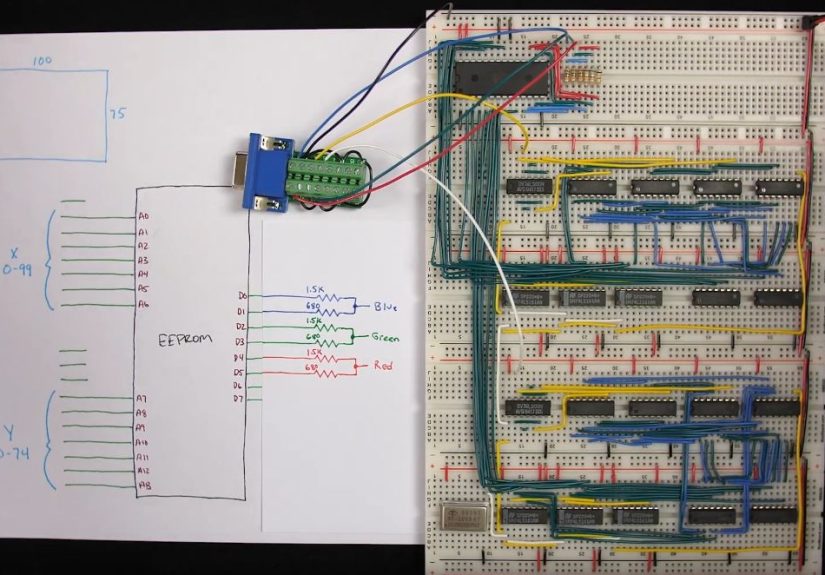
You do not even need a microcontroller or FPGA to create basic VGA. With counters, oscillators, logic gates, ROMs, and resistor networks, it is possible to generate simple video patterns. This approach is less flexible but deeply educational.
A crystal oscillator can provide the pixel clock. Binary counters can track horizontal and vertical positions. Logic gates can generate sync pulses when the counters reach specific values. ROM or combinational logic can decide the color for each coordinate. The result might be a test pattern, a grid, a logo, or a simple animated display.
This style of design feels like building a tiny video card from first principles. It is not the fastest way to make a screen say “hello,” but it may be the most satisfying. Every pixel appears because the hardware physically counts its way there.
Building the Analog Output: Resistor DACs
Most low-cost VGA projects use resistors to turn digital pins into analog color levels. A one-bit-per-channel design gives eight colors: black, red, green, blue, cyan, magenta, yellow, and white. Add more bits per channel and you get more shades.
A simple design might use one GPIO pin each for red, green, and blue. A better design might use two or three pins per color channel and combine them through weighted resistors. For example, three bits for red, three bits for green, and two bits for blue gives 256 possible colors. Human vision is more sensitive to green, so many designs allocate extra precision there.
Resistor values must be chosen with the monitor’s termination in mind. The goal is not merely to output “some voltage.” The goal is to produce a reasonable VGA-level signal when connected to the display. Breadboards and long jumper wires can add noise, reflections, and color weirdness. For cleaner results, keep analog lines short, use decent grounding, and move from breadboard to soldered board when the design becomes serious.
Framebuffers, Line Buffers, and Procedural Pixels
The most obvious way to draw a screen is to store a framebuffer: one memory location for each pixel. That is how many graphics systems work. In small embedded VGA projects, however, full framebuffers can be expensive or impossible.
A line buffer stores only one scan line at a time. The software prepares the next line while the hardware outputs the current one. This saves memory but increases timing complexity. A tile-based system stores small reusable graphic blocks and maps them across the screen. A text mode stores characters and attributes, then converts them to pixels during output. Procedural graphics calculate pixel colors on the fly using formulas, counters, or game object positions.
Each method has trade-offs. A framebuffer is flexible but memory-hungry. A text mode is efficient but limited. Procedural graphics are elegant but can become CPU-intensive. The right answer depends on whether you are building a game, a dashboard, an oscilloscope-style display, a retro terminal, or a blinking logo that proudly says, “I made a monitor obey me.”
Common Problems When Driving VGA Without a PC
The Monitor Says “Out of Range”
This usually means the timing is wrong. Check the pixel clock, horizontal total, vertical total, sync pulse widths, and sync polarity. Some monitors accept approximate timings. Others require values closer to the standard.
The Image Is Shifted
If the picture appears too far left, right, up, or down, your porch intervals may need adjustment. The visible area might be correct, but the blanking timing around it is not quite where the monitor expects it.
The Colors Look Wrong
Color problems often come from resistor values, wiring mistakes, missing grounds, or poor signal levels. Make sure the red, green, and blue pins are connected correctly and that the ground pins are solid. VGA is analog, so messy wiring can produce messy pictures.
The Image Flickers or Tears
Flicker can come from unstable timing, slow rendering, bad buffering, or interrupt interference. If software updates the same memory that the video hardware is reading, visible tearing may appear. Double buffering can help, but it requires more RAM.
Best Project Ideas for VGA Without a PC
A great first project is a color bar test pattern. It proves that sync and RGB output work. Next, try drawing a border, grid, or moving square. These projects teach coordinate logic without demanding much memory.
After that, text output is a natural step. A VGA terminal with an 8×8 font can display debugging information, sensor data, or retro-style menus. For microcontrollers, text mode is practical because it stores characters instead of pixels.
Simple games are also excellent. Pong, Snake, Breakout, and falling-block games fit well within limited graphics hardware. They use simple shapes, few colors, and predictable timing. More ambitious builders can try sprite engines, tile maps, waveform displays, Mandelbrot demos, or tiny GUIs.
Why This Still Matters
Driving VGA without a PC is not just nostalgia. It teaches the relationship between time, memory, and visual output. Modern graphics APIs hide enormous complexity, which is convenient but abstract. VGA brings the fundamentals back into view.
You learn that a display is not a static canvas. It is a constant stream. You learn why clocks matter, why buffers exist, why memory bandwidth is precious, and why video hardware became specialized in the first place. You also gain a new respect for old computers that produced colorful graphics with tiny amounts of RAM.
And honestly, there is a special joy in seeing a monitor display an image generated by something that is clearly not a PC. A tiny board, a few resistors, and a VGA cable can create a working video signal. It feels like sneaking into the graphics club through the service entrance.
Practical Experience: Lessons From Pushing Pixels the Hard Way
The first lesson of VGA projects is that the monitor is not your enemy, but it is also not your therapist. It will not patiently explain what you did wrong. It will simply show a black screen, complain about the signal, or display a picture that looks like it fell down a staircase. This is why starting with the simplest possible output matters. Before drawing fonts, sprites, or animations, generate a stable sync signal and a solid color. Then make color bars. Then draw a box. Tiny victories are the best debugging tool.
The second lesson is that timing errors are often invisible in code but obvious on screen. A single off-by-one count in the horizontal timing can nudge the image. A wrong vertical total can make the monitor refuse the signal. A pixel clock that is close but not close enough may work on one display and fail on another. This is why testing with more than one monitor is useful. Older LCD monitors with VGA inputs are often more forgiving than newer adapters or capture devices.
The third lesson is that wiring quality matters more than beginners expect. VGA may be old, but it is still an analog video interface running at fairly high speed. Long jumper wires, loose grounds, and breadboard capacitance can soften edges and distort color levels. On a breadboard, a simple eight-color display may work fine, while a higher-color resistor DAC looks muddy. Moving the circuit to a compact soldered board or PCB can make the image noticeably cleaner.
The fourth lesson is to respect memory early. Many exciting ideas collapse when you calculate the framebuffer size. Full 640×480 graphics sound modest until you multiply the pixels by color depth. A small microcontroller cannot casually store multiple full frames. The smart move is to design the visual style around the hardware. Use tiles, fonts, repeated pixels, line buffers, limited palettes, or procedural drawing. Constraints are not the enemy. In VGA projects, constraints are the art director.
The fifth lesson is that test patterns are not boring. A grid pattern can reveal geometry problems. Vertical color bars can reveal color-channel wiring mistakes. A moving square can reveal tearing or update-rate problems. Alternating black-and-white pixels can reveal bandwidth and signal-quality limits. Every test pattern is a little diagnostic instrument wearing a very plain outfit.
The sixth lesson is to separate video generation from application logic whenever possible. On RP2040 designs, PIO and DMA are valuable because they handle the strict timing while the CPU does other work. On FPGA designs, dedicated counters and pixel pipelines keep video stable while other modules update game state or data. On smaller microcontrollers, you may not have that luxury, so the application must be carefully arranged around the video schedule.
The final lesson is that VGA projects reward patience. You may spend hours getting a blank screen, then suddenly see a white rectangle appear and feel like you invented television. That moment is worth it. Pushing pixels without a PC is not the easiest way to display information, but it is one of the clearest ways to understand what a display signal really is. It turns graphics from a software abstraction into a physical event, repeated millions of times per second, one pixel at a time.
Conclusion
Pushing pixels to a display with VGA without a PC is a perfect mix of retro charm and serious engineering. It begins with a simple idea: generate RGB signals and sync pulses. Then it quickly opens into timing math, analog voltage levels, memory strategy, hardware design, and creative problem-solving.
Microcontrollers can do it with careful compromises. RP2040 boards can do it elegantly with PIO and DMA. FPGAs can do it with clean parallel logic. Even discrete components can create basic patterns if the timing is right. The best approach depends on your goal, but the lesson is the same: video is a stream, and the display rewards precision.
Whether you are building a tiny game console, a retro terminal, a lab instrument, or a weekend project just because it sounds delightfully unnecessary, VGA is still a fantastic playground. It is old, forgiving, educational, and just difficult enough to make the first successful image feel like a small miracle.