Table of Contents >> Show >> Hide
- What Samsung Actually Added: The Odyssey OLED G8 in Plain English
- Quick Specs Snapshot: The Stuff Gamers Actually Ask About
- Why QD-OLED Matters: OLED’s Strengths, Turned Up a Notch
- The Odyssey Twist: A Gaming Monitor That Thinks It’s a Smart TV
- Design: Ultra-Slim, Ultra-Showy, and Very Much “Look at Me”
- Where It Fits in the Odyssey Family: From Curves to OLED to “How Fast Can You Even See?”
- Pricing and Availability: Premium, Because OLED Still Isn’t Cheap
- Who This Monitor Is Really For (and Who Should Probably Pass)
- OLED Reality Check: Burn-In, Better Tech, and Smarter Habits
- How to Get the Best Picture: Setup Tweaks That Actually Matter
- Competition and Context: Samsung Isn’t Alone in the OLED Race
- Real-World Experiences: What It’s Like Living With a Samsung Odyssey OLED Setup (About )
- Conclusion
Somewhere out there, a gamer just whispered “OLED” the way people in movies whisper “treasure.”
And honestly? Fair. Once you’ve seen true blacks in a dark scenelike, “did my monitor turn off?” blackit’s tough to go back.
Samsung knows this, which is why it keeps sliding more OLED into its Odyssey gaming family like it’s adding extra cheese to a pizza no one asked to be “light.”
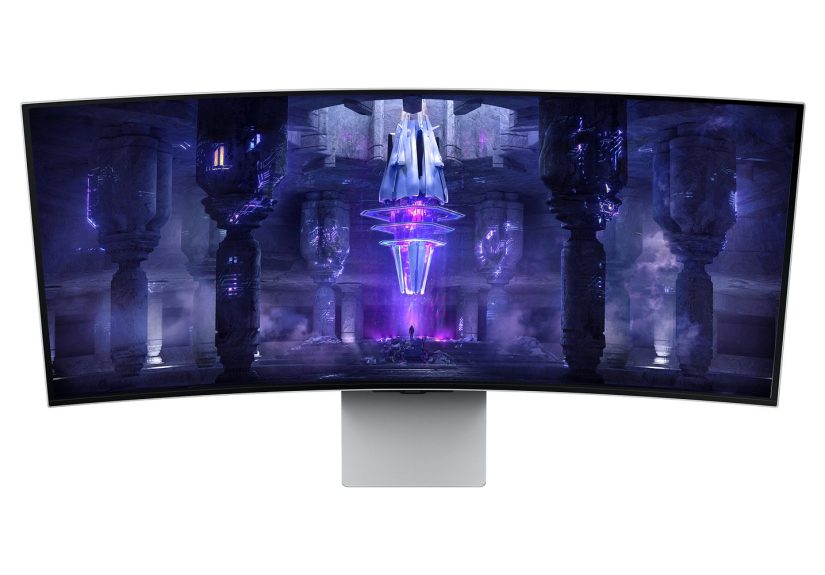
The headline moment: Samsung added another OLED gaming monitor to the Odyssey lineup in the form of the Odyssey OLED G8 (G85SB),
a 34-inch ultrawide QD-OLED display that aims to do two things at once: deliver high-end competitive speed and feel like a premium “centerpiece” screen
that can also behave a bit like a smart TV. It’s a very Samsung movehigh performance, high gloss, and a little bit “also, it makes toast.”
What Samsung Actually Added: The Odyssey OLED G8 in Plain English
“One more OLED” is a simple phrase, but the monitor itself is not simplein a good way.
The Odyssey OLED G8 is a 34-inch ultrawide gaming monitor with Ultra-WQHD resolution (3,440 × 1,440),
a 21:9 aspect ratio, and a 1800R curve designed to wrap gameplay around your peripheral vision.
Translation: wider racetracks, wider battlefields, and a lot more room for your minimap to bully you.
Samsung positioned this model as a premium OLED entry within Odysseyleaning into OLED’s strengths (contrast, per-pixel lighting, instant pixel response)
while layering on gaming-focused refresh rate and variable refresh support. It also borrows a page from Samsung TVs by baking in a smart platform,
streaming apps, and cloud gaming options.
Quick Specs Snapshot: The Stuff Gamers Actually Ask About
Display and speed
- Size / shape: 34-inch ultrawide, 1800R curved
- Resolution: 3,440 × 1,440 (Ultra-WQHD), 21:9
- Refresh rate: up to 175Hz
- Response time: Samsung has cited ultra-low figures (commonly listed as 0.03ms GtG in retail messaging; some early coverage mentioned 0.1ms)
- Adaptive sync: AMD FreeSync Premium Pro; broad VRR support is a major selling point for tear-free gameplay
- HDR: HDR True Black 400 is part of the OLED pitch heredeep blacks, defined highlights
Ports and convenience
- Connectivity highlights: HDMI 2.1-class support, a Mini DisplayPort format, and USB-C
- USB-C charging: up to 65W (handy for laptops and “one cable” desk setups)
- Audio: built-in speakers show up in multiple launch details (so yes, you can hear something without hunting for that one missing cable)
Specs are only half the story, though. The other half is what Samsung is trying to do strategically:
make OLED feel like the “default premium” for Odysseynot a niche flex.
Why QD-OLED Matters: OLED’s Strengths, Turned Up a Notch
Standard LCD gaming monitors rely on a backlight. OLED doesn’t. Each pixel lights itself, which is why OLED blacks can look absurdly deep.
QD-OLED (Quantum Dot OLED) adds quantum dots into the mix to boost color volume and perceived brightness while keeping OLED’s contrast advantage.
The result is typically a vivid, high-impact imageespecially in HDR content where highlights and shadows share the screen.
That matters in real games. Think neon-heavy cyberpunk cities, dark caves with a torch flickering, or space scenes where “black background” is basically the entire vibe.
OLED helps those scenes look less like gray soup. QD-OLED aims to keep colors punchy without sacrificing the inky contrast that makes OLED feel special.
Samsung’s messaging leans heavily into “true black” and “true RGB,” emphasizing that it doesn’t need a color filter or traditional backlighting.
In practical terms, it’s about clarity and separation: enemies don’t melt into the shadows, and bright UI elements don’t wash out the whole scene.
The Odyssey Twist: A Gaming Monitor That Thinks It’s a Smart TV
The Odyssey OLED G8 wasn’t built only for “PC + DisplayPort + RGB keyboard + vibes.”
Samsung also pushed the idea that you can treat it like a standalone entertainment screen,
thanks to its Smart TV platform, built-in streaming apps, and Gaming Hub for cloud gaming.
That means you can fire up streaming services without a PC, and in supported regions you can access cloud gaming apps through the monitor’s interface.
This is the part that divides people:
some gamers want their monitor to be a pure, simple displayno menus, no smart OS, no “update available” pop-up right when the raid starts.
Others love the flexibility: one screen that can handle work, console gaming, PC gaming, and Netflix without needing an extra device.
Samsung is betting there are enough “desk TV” people to make this a feature, not a distraction.
Why this matters for small spaces
If your setup is a bedroom or apartment desk, a monitor that can double as a streaming screen is genuinely useful.
Instead of buying a small TV (and figuring out where it goes), you’re basically consolidating. One screen. One remote. Fewer regrets.
And if you ever wanted to play a quick cloud-streamed game without firing up the full rig, Samsung wants that to feel normal.
Design: Ultra-Slim, Ultra-Showy, and Very Much “Look at Me”
Samsung didn’t hide what it was doing here. The OLED G8 is meant to look premium: slim profile, metal-forward styling,
and a lighting system designed to match your on-screen content.
It’s not the “black plastic rectangle” era. It’s the “this belongs in a sci-fi set” era.
The lighting features (including variants of Samsung’s “Core” lighting approach) are part aesthetic, part ambiance.
If you’re the type of person who’s ever said, “My desk feels too bright,” this is Samsung giving you permission
to replace overhead lighting with gentle monitor glow and the warm feeling of questionable financial decisions.
Where It Fits in the Odyssey Family: From Curves to OLED to “How Fast Can You Even See?”
Odyssey has always been Samsung’s gaming playground: dramatic curvature, high refresh rates, aggressive specs, and big swings.
Adding OLED into the lineup is less “one product” and more “direction of travel.”
The OLED G8 helped set the tone: OLED isn’t just for TVs anymore; it’s a legitimate gaming monitor strategy.
If you zoom out, Samsung’s broader Odyssey cadence reinforces that.
In later Odyssey announcements, Samsung kept pushing either higher refresh rates or higher resolution (sometimes both),
with OLED models appearing alongside experimental features like glasses-free 3D and extreme dual-mode refresh ideas.
The point isn’t that every gamer needs every featurethe point is that Odyssey is positioned as the “we’ll try it first” lineup.
Pricing and Availability: Premium, Because OLED Still Isn’t Cheap
In the U.S., Samsung positioned the Odyssey OLED G8 as a premium product, with retail availability and pricing reflecting that.
Launch availability messaging placed it at $1,499.99 in the U.S. through Samsung and select retailers.
That price firmly plants it in the “flagship monitor” categoryright alongside other high-end ultrawide OLED options.
The important practical takeaway: if you’re shopping this class of monitor, you’re not paying for one feature.
You’re paying for the combinationOLED contrast, ultrawide immersion, high refresh rate, smart platform features, and premium industrial design.
Whether that bundle is worth it depends on your setup and how you actually play.
Who This Monitor Is Really For (and Who Should Probably Pass)
Buyers who will love it
- Immersion gamers: RPGs, racing, open-world explorationultrawide + OLED is a “wow” combo.
- Multi-use desk setups: if your monitor is also your TV, the smart platform isn’t a gimmickit’s convenience.
- People sensitive to motion clarity: high refresh plus OLED pixel response can feel extremely crisp in fast games.
- Color lovers: OLED’s contrast and QD-OLED color volume make games and media look rich and dramatic.
Buyers who should think twice
- Strict esports purists: you might prefer a smaller, simpler panel designed only for maximum speed and minimal fuss.
- Heavy static-UI productivity users: OLED can be used for work, but it benefits from good habits (more on that below).
- Anyone who hates smart TV menus: if extra software makes you itch, a “dumb” display might make you happier.
OLED Reality Check: Burn-In, Better Tech, and Smarter Habits
Let’s address the monster under the desk: burn-in.
OLED has improved a lot, and modern panels plus mitigation features reduce risk, but the concern hasn’t disappeared.
Long-term tests and coverage across the industry still treat burn-in as something to take seriouslyespecially for users who keep
static elements (taskbars, HUDs, bright logos) on screen for many hours every day.
The good news is you can stack the odds in your favor with habits that cost exactly $0:
hide static UI when possible, use screen savers, vary content, avoid leaving a bright desktop on for hours, and let the panel run its maintenance routines.
Treat it like a sports car: it’s amazing when you drive it right, but maybe don’t use it as a bulldozer.
Practical OLED care tips for gamers
- Use auto-hide taskbar on Windows (or keep it dim) if you do a lot of desktop time.
- Lower static HUD brightness in games that allow it (MMOs and survival games are notorious).
- Enable any panel care / pixel refresh features the monitor provides and don’t unplug it constantly.
- Use a darker desktop theme and avoid leaving a bright browser window parked all day.
None of this is meant to scare you off. It’s meant to keep your “OLED honeymoon” from turning into an “OLED paperwork” situation.
How to Get the Best Picture: Setup Tweaks That Actually Matter
High-end monitors can look shockingly different depending on setup. A few tweaks can turn “pretty good” into “oh wow.”
Here’s what typically makes the biggest difference with an ultrawide OLED gaming monitor:
1) Feed it the right signal
Use a quality cable and the right port for your hardware. If you’re using a modern GPU, make sure you’re actually running at the intended refresh rate
in your OS and game settings. (It’s very easy to accidentally live at 60Hz and blame the monitor.)
2) Tune HDR intentionally
HDR can be incredibleor it can look washed out if settings are mismatched. If you use HDR, calibrate in Windows (or console settings),
and then adjust in-game HDR sliders. Many games ship with wildly different HDR implementations, so “set once and forget” isn’t always realistic.
3) Embrace ultrawide smartly
Some games are ultrawide masterpieces. Others behave like they’ve never met a 21:9 screen before.
When a game supports ultrawide properly, you’ll get an expanded field of view that feels natural. When it doesn’t,
you may see pillarboxing, stretched UI, or camera weirdness. Knowing this upfront helps manage expectations.
Competition and Context: Samsung Isn’t Alone in the OLED Race
The Odyssey OLED G8 arrived in a market where OLED gaming monitors were already gaining momentum.
Competing ultrawide QD-OLED displays (notably from other major brands using similar panel tech) helped establish the category:
premium pricing, premium contrast, and a big emphasis on refresh rate plus response time.
Where Samsung tries to stand out is the “total package” approach:
premium design language, the smart TV platform, Gaming Hub, and an ecosystem story that includes SmartThings and Samsung’s broader display lineup.
Even in later years, coverage frequently highlights Samsung’s habit of merging “monitor” and “TV” featuressometimes to real benefit,
sometimes to user annoyance, depending on your taste.
And Samsung hasn’t slowed down. Subsequent Odyssey OLED models and announcements kept pushing boundaries:
higher refresh OLED options, 4K OLED at high refresh rates, and ambitious “next-gen” monitor concepts in the Odyssey family.
In other words, this “one more OLED monitor” wasn’t a one-offit was a directional signpost.
Real-World Experiences: What It’s Like Living With a Samsung Odyssey OLED Setup (About )
Owning an ultrawide OLED gaming monitor tends to change how people use their whole desknot just how they play one game.
The first obvious “experience moment” is often a dark scene: loading into a night mission, creeping through a dim hallway,
or watching space dust drift across a black skybox. On OLED, black isn’t gray. It’s genuinely dark, which makes small highlights
a glowing doorway, a muzzle flash, a neon signstand out with a kind of depth that LCD backlights struggle to match.
Many users describe it as less like “turning up brightness” and more like “adding dimensionality.”
The second big experience shift is motion. With high refresh rates and near-instant pixel response,
fast camera pans in shooters and racing games can look cleaner and less smeary. The practical effect is that tracking feels easier:
enemies don’t blur into the background as aggressively, and fine detail in motion (like distant objects or thin UI elements) stays legible.
It’s not that the monitor makes anyone better overnightbut it reduces friction. You spend less time fighting motion artifacts
and more time reacting to what’s actually happening.
Ultrawide also rewires immersion. Racing games become the obvious example: a 21:9 view can make cockpits feel more convincing,
because you see more of the world without relying on a “fish-eye” field-of-view trick. Open-world games benefit too:
cities feel broader, landscapes feel more panoramic, and you get that subtle “I’m inside this place” sensation.
The tradeoff is that not every game is perfectly behaved at 21:9. Some titles fully embrace it; others compromise with black bars,
quirky UI placement, or cutscenes that revert to standard framing. The experience is best when you treat ultrawide as a bonus,
not a guarantee.
Then there’s the “monitor that moonlights as a TV” angle. For some setups, it’s a genuine win:
you can finish a gaming session, switch to streaming, and not feel like you need a second screen in the room.
Cloud gaming options (where supported) can also feel surprisingly practical: a quick session without powering on a console or PC,
especially for casual play or trying a new title. For other users, smart features can feel like extra steps between them and their input source.
The difference usually comes down to tolerance for TV-like menus and updates.
Day-to-day, the best experience comes from small habits: using darker desktop themes, avoiding leaving static bright windows parked for hours,
and letting the monitor run its maintenance routines. People who do that tend to report fewer worries and more “this looks incredible”
moments over the long haul. The monitor becomes less of a fragile showpiece and more of a dependable centerpieceexactly what
Samsung is aiming for with the Odyssey OLED identity.
Conclusion
“Samsung adds one more OLED gaming monitor” sounds like a small update, but the Odyssey OLED G8 represents something bigger:
OLED is no longer just a premium TV storyit’s a serious gaming monitor strategy.
With an ultrawide QD-OLED panel, high refresh performance, and a smart TV-style feature set, the OLED G8 targets gamers who want
top-tier image quality and a screen that can anchor an entire entertainment-and-work setup.
It’s premium-priced, unapologetically feature-rich, and very Odyssey: bold, slightly extra, and built for people who want their desk to feel like a command center.